# Traffic

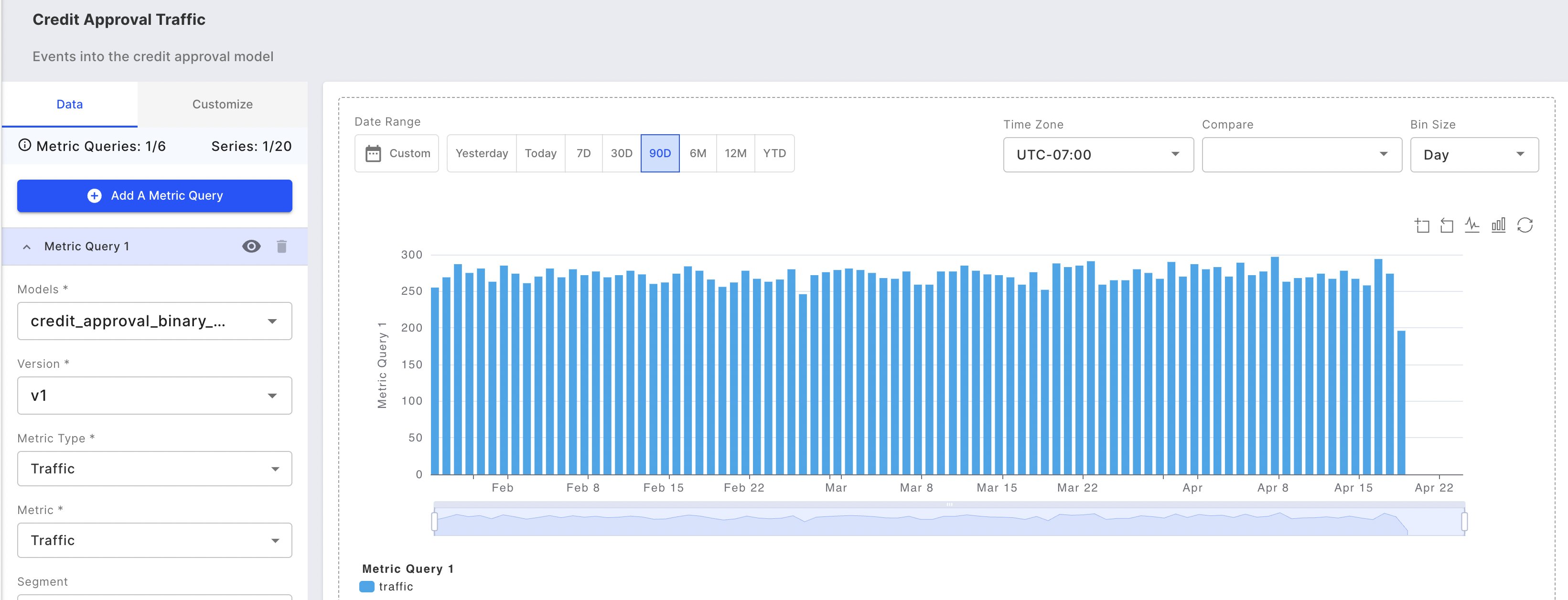
Traffic as a service metric gives you basic insights into the operational health of your model's service in production.

![Example of a Fiddler Chart displaying a model's traffic.](/files/lYjb7TWihyzLVINliqmx)

## What is Being Tracked?

* ***Traffic*** — The volume of traffic received by the model over time.

## Why is it Being Tracked?

* Traffic is a basic high-level metric that informs us of the model's output activity.

## What Steps Should I Take When I See an Outlier?

* A dip or spike in traffic needs to be investigated. For example, a dip could be due to a production model server going down; a spike could be an adversarial attack.


---

# Agent Instructions: Querying This Documentation

If you need additional information that is not directly available in this page, you can query the documentation dynamically by asking a question.

Perform an HTTP GET request on the current page URL with the `ask` query parameter:

```
GET https://docs.fiddler.ai/observability/platform/traffic-platform.md?ask=<question>
```

The question should be specific, self-contained, and written in natural language.
The response will contain a direct answer to the question and relevant excerpts and sources from the documentation.

Use this mechanism when the answer is not explicitly present in the current page, you need clarification or additional context, or you want to retrieve related documentation sections.
