
Quick Start Guides
Ready to start testing your LLM applications? Choose the hands-on guide that matches your evaluation needs. Each quick start provides step-by-step instructions, code examples, and takes 15-20 minutes to complete.New to Fiddler Experiments? Start with our comprehensive Experiments guide to understand core concepts, workflows, and best practices before diving into these quick starts.
Evals SDK Quick Start
Build comprehensive experiment workflows with built-in and custom evaluators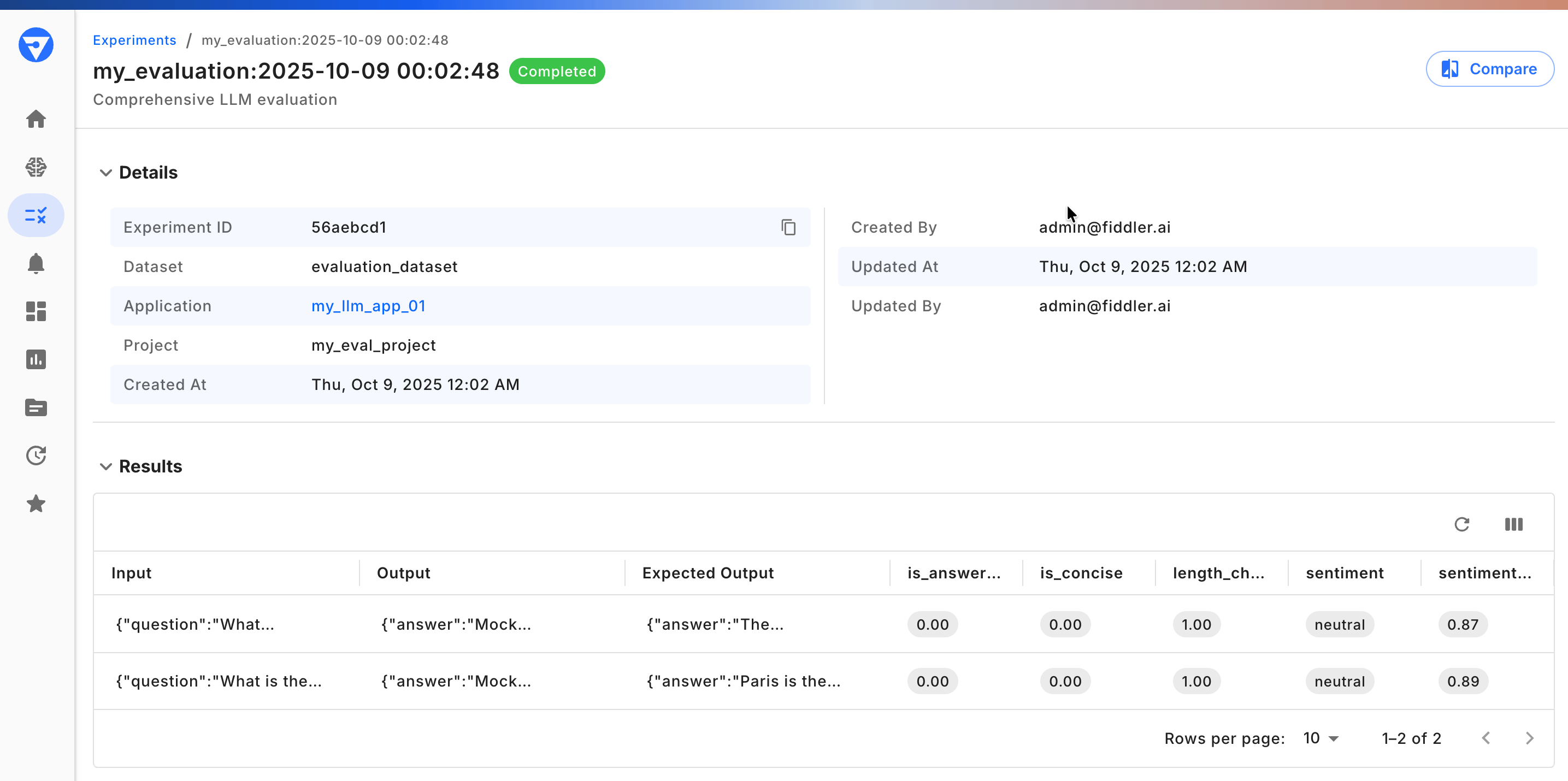
Analyze experiment results with detailed metrics and insights
- Connect to Fiddler and set up evaluation projects
- Create datasets with test cases (CSV, JSONL, or DataFrame)
- Use production-ready evaluators (Relevance, Coherence, Toxicity, Sentiment)
- Build custom evaluators for domain-specific requirements
- Run experiments with parallel processing
- Analyze results and export data for further analysis
- Teams needing full control over evaluation logic
- Building comprehensive test suites with multiple quality dimensions
- Creating domain-specific custom metrics
- Programmatic experiment workflows and CI/CD integration
Prompt Specs Quick Start
Create custom LLM-as-a-Judge evaluations without manual prompt engineering What you’ll build: A news article topic classifier that demonstrates:- Schema-based evaluation definition (no prompt writing!)
- Validation and testing workflows
- Iterative improvement with field descriptions
- Production deployment as Fiddler enrichments
- Define evaluation schemas using JSON
- Validate Prompt Specs before deployment
- Test evaluation logic with sample data
- Improve accuracy through structured descriptions
- Deploy custom evaluators to production monitoring
- Teams needing domain-specific evaluation logic
- Avoiding time-consuming prompt engineering
- Rapid iteration on evaluation criteria
- Schema-driven evaluation workflows
Compare LLM Outputs
Systematically compare different LLM models to make data-driven decisions What you’ll learn:- Compare outputs from different LLM models (GPT-4, Claude, Llama, etc.)
- Evaluate multiple prompt variations side-by-side
- Use Fiddler’s observability features for pre-production testing
- Balance quality, cost, and latency trade-offs
- Model selection and validation
- Prompt A/B testing and optimization
- Cost optimization through model comparison
- Pre-production evaluation of LLM outputs
Choosing the Right Quick Start
Not sure which guide to start with? Use this table:
Quick recommendations:
- 🎯 First-time users: Start with Evals SDK Quick Start to learn the fundamentals
- 🔧 Custom evaluations needed: Use Prompt Specs Quick Start for schema-based approach
- 📊 Model comparison: Jump to Compare LLM Outputs for side-by-side testing
Core Evaluation Concepts
These quick starts demonstrate key Fiddler Experiments capabilities:Built-in Evaluators
Production-ready metrics that run on Fiddler Centor Models:- Quality: Answer Relevance, Coherence, Conciseness, Completeness
- Safety: Toxicity Detection, Prompt Injection, PII Detection
- RAG-Specific: Faithfulness, Context Relevance
- Sentiment: Multi-score sentiment and topic classification
- Zero external API costs
- <100ms latency for real-time evaluation
- Your data never leaves your environment
Custom Evaluation Frameworks
Build domain-specific evaluators using:- Python-based evaluators - Full programmatic control
- Prompt Specs - Schema-driven LLM-as-a-Judge (no manual prompting)
- Function wrappers - Integrate existing evaluation logic
Experiment Tracking & Comparison
Every experiment run is tracked:- Complete lineage of inputs, outputs, and scores
- Side-by-side experiment comparison in Fiddler UI
- Aggregate statistics and drill-down analysis
- Export capabilities for further processing
Common Experiment Workflows
These quick starts support various experiment scenarios:Pre-Production Testing
- Regression Testing: Run comprehensive test suites before deployment
- Quality Gates: Set score thresholds that must be met
- Version Validation: Compare model versions on same datasets
Model & Prompt Optimization
- A/B Testing: Compare prompt variations quantitatively
- Model Selection: Evaluate multiple LLMs on same tasks
- Hyperparameter Tuning: Test temperature, top-p, and other configs
RAG System Evaluation
Evaluate RAG pipelines end-to-end using the RAG Health Metrics evaluators — a purpose-built diagnostic framework that pinpoints whether issues originate in retrieval, generation, or query understanding:- Answer Relevance 2.0: Assess how well responses address user queries with ordinal scoring (High / Medium / Low)
- Context Relevance: Measure whether retrieved documents are relevant to the query (High / Medium / Low)
- RAG Faithfulness: Verify responses are grounded in retrieved documents (Yes / No with reasoning)
Safety & Compliance
- Adversarial Testing: Test with jailbreak attempts and prompt injections
- Content Moderation: Measure toxicity, bias, and PII exposure
- Policy Validation: Ensure outputs meet organizational standards
From Development to Production
Fiddler Experiments integrates seamlessly with production monitoring: Unified Workflow Benefits:- Consistent Metrics: Same evaluators in development and production
- Continuous Learning: Production insights feed back into test datasets
- Seamless Transition: Deploy with confidence—monitoring matches testing
- Build → Design and instrument your applications
- Test → Evaluate with Fiddler Experiments (these quick starts)
- Monitor → Track production with Agentic Monitoring
- Improve → Refine based on insights
Getting Started Checklist
Ready to evaluate your LLM applications?- Choose a quick start guide based on your evaluation needs
- Install the Fiddler Evals SDK (for SDK and Prompt Specs guides)
- Prepare 5-10 sample test cases for your application
- Follow the step-by-step guide (15-20 minutes)
- Review results in Fiddler UI
- Iterate and expand your experiment coverage
Additional Resources
Learn More:- Experiments Overview - Comprehensive guide to Fiddler Experiments
- Golden Datasets - Build datasets from real production spans
- Capture Traces During Experiments - Debug and score on execution traces
- Evals SDK Advanced Guide - Production patterns
- Fiddler Evals SDK Reference - Complete API documentation
- Experiments Glossary - Key terminology
- Agentic Monitoring - Production agent observability
- LLM Monitoring - Production LLM tracking
- Guardrails - Real-time safety validation