
What You’ll Learn
In this guide, you’ll learn how to:- Connect to Fiddler and set up your experiment environment
- Create projects, applications, and datasets for organizing experiments
- Build experiment datasets with test cases
- Use built-in evaluators for common AI evaluation tasks
- Create custom evaluators for domain-specific requirements
- Run comprehensive experiments
- Analyze results with detailed metrics and insights
Prerequisites
Before you begin, ensure you have:- Fiddler Account: An active account with access to create applications
- Python 3.10+
- Fiddler Evals SDK:
pip install fiddler-evals
- Fiddler API Key: Get your API key from Settings > Credentials in your Fiddler instance
If you prefer using a notebook, download a fully functional quick start directly from GitHub or open it in Google Colab to get started.
1
Connect to Fiddler
First, establish a connection to your Fiddler instance using the Evals SDK.Connection Setup:
2
Create Project and Application
Fiddler Experiments uses a hierarchical structure to organize your experiments:What This Creates:
- Projects provide organizational boundaries for related applications
- Applications represent specific AI systems you want to evaluate
- Datasets contain test cases for experiments
- Experiments track individual evaluation runs
- A project to organize all your experiment work
- An application representing your AI system under test
- Persistent IDs for tracking results over time
3
Build Your Experiment Dataset
Datasets contain the test cases you’ll use to evaluate your AI applications. Each test case includes:Data Import Options:
- Inputs: Data passed to your AI application (questions, prompts, etc.)
- Expected Outputs: What you expect the application to return
- Metadata: Additional context (categories, types, tags)
- CSV
- JSONL
- DataFrame
4
Use Built-in Evaluators
Fiddler Experiments provides production-ready evaluators for common AI evaluation tasks. Let’s test some key evaluators:Available Built-in Evaluators:
RAG Health Metrics:
AnswerRelevance, ContextRelevance, and RAGFaithfulness form the RAG diagnostic triad. All LLM-as-a-Judge evaluators require model and credential parameters at initialization (e.g., AnswerRelevance(model="openai/gpt-4o", credential="your-credential")). See the RAG Health Metrics Tutorial for a complete walkthrough.5
Create Custom Evaluators
Build custom evaluation logic for your specific use cases by inheriting from the Function-Based Evaluators:You can also use simple functions:
Evaluator base class:6
Run Experiments
Now run a comprehensive experiment. The Score Function Mapping:The Advanced Mapping with Lambda Functions (for nested values):How It Works:This allows you to use any evaluator without changing your task function structure.
evaluate() function:- Runs your AI application task on each dataset item
- Executes all evaluators on the results
- Tracks the experiment in Fiddler
- Returns comprehensive results with scores and timing
score_fn_kwargs_mapping parameter connects your task outputs to evaluator inputs. This is necessary because evaluators expect specific parameter names (like response, prompt, text) but your task may use different names (like answer, question).Simple String Mapping (use this for most cases):- Your task returns a dict:
{"answer": "Some response"} - The mapping tells Fiddler: “When an evaluator needs
rag_response, use the value fromanswer” - Each evaluator gets the parameters it needs automatically
7
Analyze Experiment Results
After running your experiment, analyze the comprehensive results in your notebook or the Fiddler UI: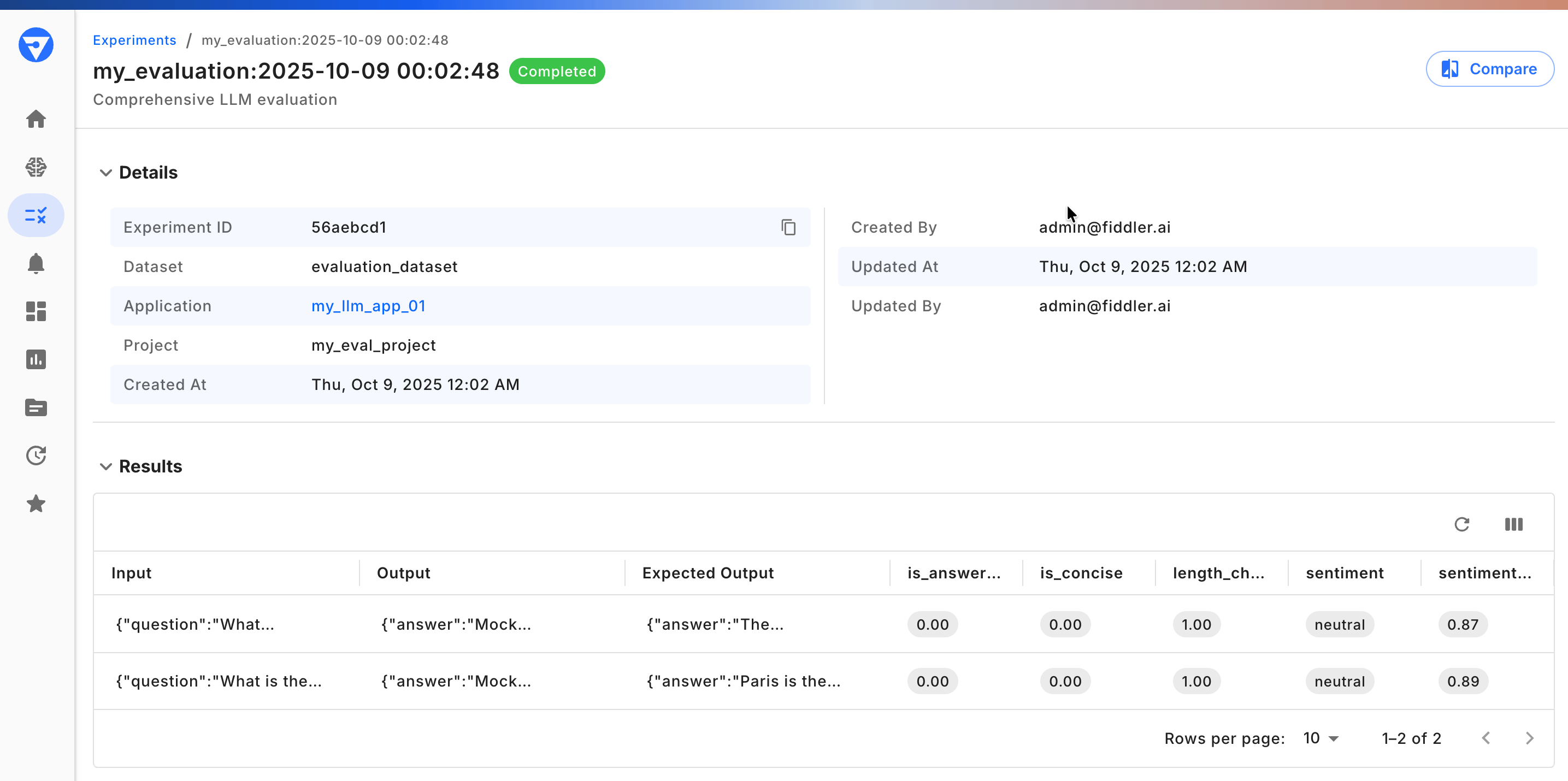
- Fiddler Experiments UI
- Notebook
Next Steps
Now that you have the Fiddler Evals SDK set up, explore these advanced capabilities:- Experiments First Steps: An overview of Fiddler Experiments
- Quick Start Notebook: Download and run a more expansive version of this quick start guide
- Fiddler Evals SDK: Review the SDK technical reference
- Advanced Evals Guide: Build sophisticated evaluation logic
Troubleshooting
Connection Issues
Issue: Cannot connect to Fiddler instance. Solutions:- Verify credentials
-
Test network connectivity:
-
Validate API key:
- Ensure your API key is valid and not expired
- Regenerate API key if needed from Settings > Credentials
- Ensure your API key is valid and not expired
-
Test network connectivity:
Import Errors
Issue:ModuleNotFoundError: No module named 'fiddler_evals'
Solutions:
-
Verify installation:
-
Reinstall the SDK:
-
Check Python version:
- Requires Python 3.10 or higher
- Run
python --versionto verify
Experiment Failures
Issue: Evaluators failing with errors. Solutions:-
Check parameter mapping:
-
Verify task output format:
- Task must return a dictionary
- Keys must match those referenced in score_fn_kwargs_mapping
-
Debug individual evaluators:
Performance Issues
Issue: Experiment is running slowly. Solutions:-
Use parallel processing:
-
Reduce dataset size for testing:
- Start with a small subset
- Scale up once the configuration is validated
-
Optimize LLM calls:
- Use caching for repeated queries
- Implement batching where possible