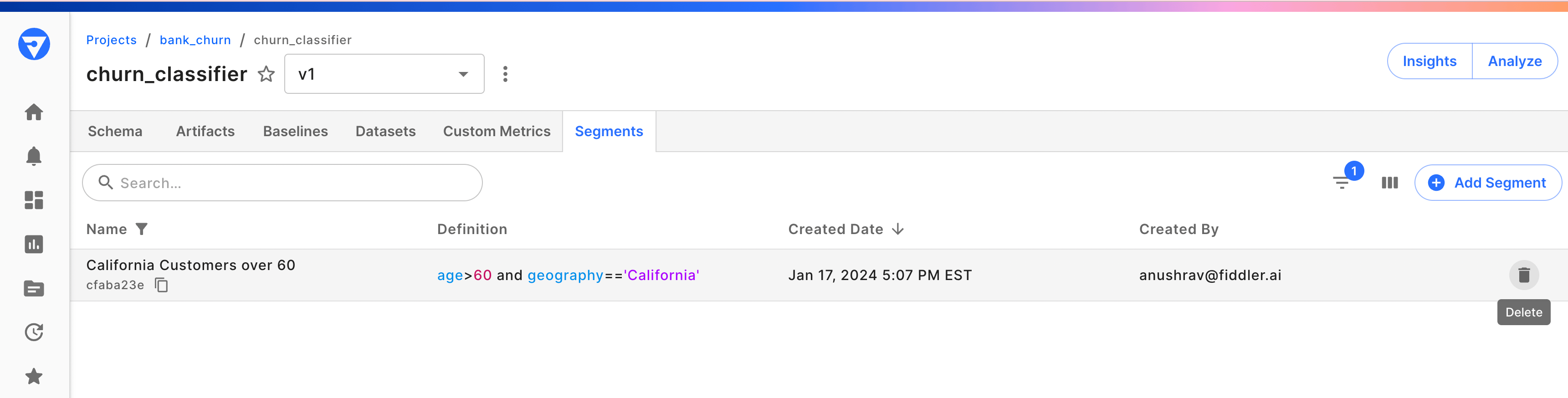
Overview
A segment, sometimes referred to as a cohort or slice, represents a distinct subset of model values crucial for performance analysis and troubleshooting. Model segments can be defined using various model dimensions, such as specific time periods or sets of features. Analyzing segments proves invaluable for understanding or troubleshooting specific cohorts of interest, particularly in tasks like bias detection, where overarching datasets might obscure statistical intricacies.How to Define a Segment
Fiddler makes it easy to define custom segments using either the Fiddler UI or the Fiddler Python client. Instructions for both approaches are covered in more detail below. In either case, Fiddler Segments are constructed using the Fiddler Query Language (FQL). You can use any of the constants, operators, and functions mentioned in the page linked above in a Segment definition. However, every Segment definition must return a boolean row-level expression. In other words, each inference will either satisfy the segment expression and thus belong to the segment or it will not.Examples
Let us illustrate further by providing a few examples. A segment can be defined by:- A condition on some column (e.g.
age > 50) - A condition on some combination of columns (e.g.
(age / max_age) < 1.0)
Adding a Segment Using the Python Client
Applied Segments
When using segments in the UI for Analytics or Monitoring Charts, applied segments offer a flexible way to define segments on the fly for exploratory analysis. These segments are not saved to the model by default, but will persist locally if the chart they are applied to is saved. At any time, an applied segment can be saved to the model. However, once a segment is saved to the model, it cannot be altered.Modifying Saved Segments
Since alerts can be set on Segments, making modifications to a Segment may introduce inconsistencies in alerts.🚧 Therefore, Saved segments cannot be modified once they are created.If you’d like to experiment with a new segment, you can create one with a different definition or use applied segments within charts.
Deleting Segments
Delete a segment using the Python client SDK. Alternatively, from the segments tab, you can delete a segment by clicking the trash icon next to the segment record.