
Overview
Fiddler ingests OpenTelemetry traces from a wide range of AI frameworks and SDKs — OTel GenAI Semantic Conventions, OpenInference (LlamaIndex, LangChain), Vercel AI SDK, Claude Code, LiteLLM, Langfuse, and many more. Each framework uses its own attribute key names for the same underlying concept. For example, the number of input tokens might be sent asgen_ai.usage.input_tokens by one framework, llm.token_count.prompt by another, and ai.usage.promptTokens by a third.
Server-side semantic mappings solve this problem by associating each raw attribute key with a canonical semantic concept — a framework-agnostic name like input_tokens, model_name, or input. This enables Fiddler’s dashboards, alerts, custom metrics, and evaluators to work consistently across all frameworks without requiring per-framework instrumentation (client-side).
Semantic mappings are enabled by default for all organizations and are the recommended way to work with span attributes. Legacy prefix conventions are deprecated — see Span and Resource Attributes for migration guidance. Existing data using legacy prefixes continues to resolve correctly via backward-compatible default mappings.
How It Works
When your application sends OpenTelemetry traces to Fiddler, the raw attribute keys are stored exactly as sent — Fiddler does not transform or rename them. In the backend, Fiddler enables you to map each attribute key to a semantic concept, producing a canonical name alongside the original key. All downstream features — monitoring charts, alert rules, custom metrics, evaluator input configuration, and the Explorer — use the semantic concept for queries. This means a dashboard showing “average input tokens over time” works identically whether your application uses the OTel GenAI convention (gen_ai.usage.input_tokens), the OpenInference convention (llm.token_count.prompt), or any other supported framework’s naming.
Custom attributes that don’t map to any semantic concept are still stored and queryable by their original key name. Semantic mapping only applies to attributes that Fiddler recognizes as carrying a known concept.
Semantic Concepts
Fiddler defines over 30 semantic concepts, organized into the following categories.Token Usage
Cost (Estimated)
Model and Provider
Agent and Tool
Session and User
Content
Performance
Span Identity
Metadata
Default Mappings
Fiddler ships with 140+ pre-configured mappings covering 13+ AI frameworks and SDKs. If your application uses any of the following frameworks, traces are automatically mapped to semantic concepts with no configuration required:- OTel GenAI Semantic Conventions — the standard OpenTelemetry conventions for generative AI (
gen_ai.usage.*,gen_ai.request.*,gen_ai.response.*) - OpenInference — used by LlamaIndex, LangChain, and other frameworks (
llm.token_count.*,input.value,output.value) - Vercel AI SDK — (
ai.usage.*,ai.prompt,ai.response.*) - Claude Code — (
input_tokens,output_tokens,user_prompt,model) - LiteLLM — (
gen_ai.cost.*) - Langfuse SDK — (
langfuse.session.id,langfuse.user.id) - Google Agent Development Kit (ADK, part of Gemini Enterprise Agent Platform) — (
gcp.vertex.agent.*) - LiveKit — (
lk.input_text,lk.response.text) - Genkit — (
genkit:input,genkit:output) - MLflow — (
mlflow.spanInputs,mlflow.spanOutputs) - Traceloop / OpenLLMetry — (
traceloop.entity.input,traceloop.entity.output)
input concept is mapped from over a dozen different attribute keys across all supported frameworks, so Fiddler can display user prompts regardless of which SDK generated the trace.
When to Add Custom Mappings
The default mappings cover most common frameworks. You may need to add custom mappings when:- Using a framework not in the default list — if your application uses an AI framework or SDK that Fiddler doesn’t ship mappings for, you can add mappings for that framework’s attribute keys.
- Custom instrumentation — if your application uses proprietary or internal attribute key names that differ from standard OTel conventions.
- Internal naming conventions — if your organization has adopted non-standard attribute key naming that you want Fiddler to recognize.
my_framework.prompt_tokens for input token counts, you can create a mapping from my_framework.prompt_tokens to the input_tokens semantic concept. After the mapping propagates, all charts, alerts, and metrics that use input_tokens will include data from this key.
Span Types
Why span type mapping is needed
Each AI framework labels span operations differently. OTel GenAI usesgen_ai.operation.name with values like chat and completion. OpenInference uses openinference.span.kind with values like LLM and RETRIEVER. Vercel AI SDK uses ai.operationId with values like ai.generateText. Langfuse uses langfuse.observation.type with values like generation. Without normalization, filtering for “all LLM calls” or “all tool executions” in Fiddler would require knowing every framework’s convention.
Fiddler resolves this by automatically normalizing raw span type values into a set of canonical types. When a span is ingested, Fiddler checks its attributes for known span type keys (determined by the semantic mapping for the span_type concept), extracts the raw value, lowercases it, and maps it to a canonical type.
Canonical span types
Fiddler recognizes 10 canonical span types:How span type is inferred
Fiddler checks the following attribute keys to find the span type value:
Once a raw value is found, it is lowercased and mapped to a canonical type using the table below. If the raw value is not recognized, the span type defaults to
span.
Recognized raw values
The following table lists all recognized raw values and the canonical span type they map to. Raw values are case-insensitive (lowercased before lookup).Identity values
These are already canonical and map directly:OpenInference
All other uppercase OpenInference values (
LLM, TOOL, AGENT, CHAIN, EMBEDDING, RETRIEVER, RERANKER, GUARDRAIL) are lowercased and match the identity values above.
Claude Code
Langfuse
OTel GenAI / LiteLLM / Strands
Genkit
Vercel AI SDK
Adding new span type mappings
If your framework uses span type values that Fiddler doesn’t recognize (appearing asspan in the Explorer), contact your Fiddler deployment administrator to add the mapping. New mappings take effect within approximately 5 minutes and apply to all subsequently ingested spans.
Managing Mappings via the UI
Semantic mappings are managed from the Settings > Semantic Mappings tab in the Fiddler UI. The tab displays all current mappings in a table with two columns:- Attribute Name — the raw OTel attribute key (e.g.,
gen_ai.usage.input_tokens) - Semantic Name — the canonical concept it maps to (e.g.,
input_tokens)
- Click the Add Mapping button
- Enter the raw attribute key in the Attribute Name field
- Select the semantic concept from the Semantic Name dropdown
- Click Add
Only Org Admins can create or delete mappings. All users can view the current mappings.
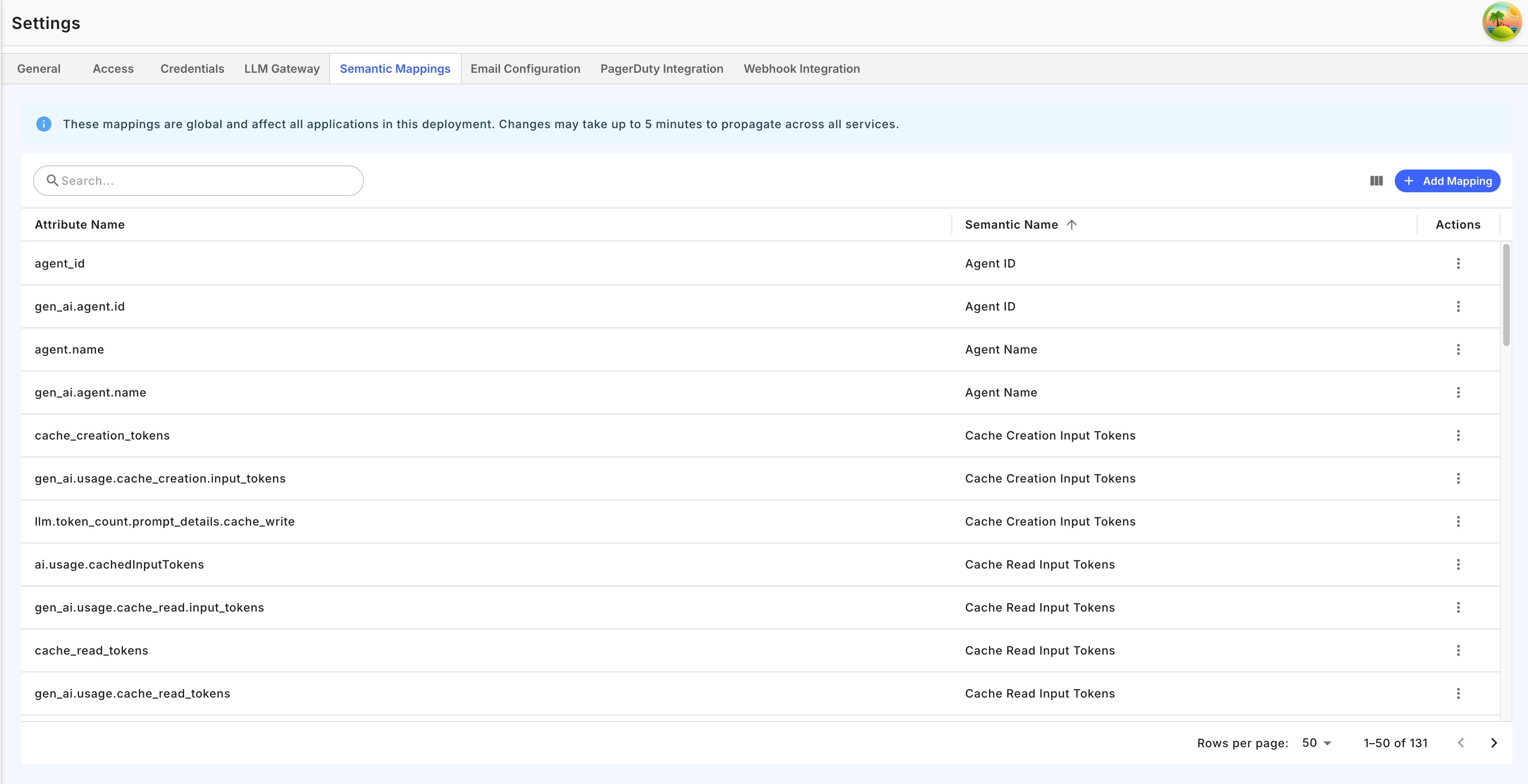
Settings > Semantic Mappings tab
Propagation
After creating or deleting a mapping, changes take effect within approximately 5 minutes. Only new spans ingested after the mapping propagates are affected — existing data is not reprocessed.Constraints and Limits
Unmapped Attributes
Attributes that don’t map to any semantic concept are still fully functional. They are stored with their original key name, appear in the Explorer’s span detail view, and are queryable in FQL custom metrics via theattribute() function. The only difference is that they won’t appear in built-in dashboards or metrics that rely on semantic concepts (such as the token usage chart or the model breakdown view). If you need an unmapped attribute to participate in these features, add a semantic mapping for it.
Deleting or Changing a Mapping
When you delete a mapping or remap an attribute key to a different semantic concept, the change only affects new spans ingested after the mapping propagates (~5 minutes). Existing data retains the semantic name that was assigned at ingestion time and is not reprocessed. This means:- Deleting a mapping — new spans with that attribute key will no longer have a semantic name assigned. The attribute is still stored and queryable by its original key, but it stops appearing in concept-based dashboards and metrics.
- Remapping to a different concept — new spans will use the new semantic concept. Older spans will continue to use the previous concept. During the transition period, both old and new data are independently queryable.