
fdl.ModelSchema object generated by fdl.Model.from_data infers a column’s data type differently than the type intended by the model developer. In these cases you can modify the ModelSchema columns as needed prior to creating the model in Fiddler.
Let’s walk through an example of how to do this.
Suppose you’ve loaded in a dataset as a pandas DataFrame.
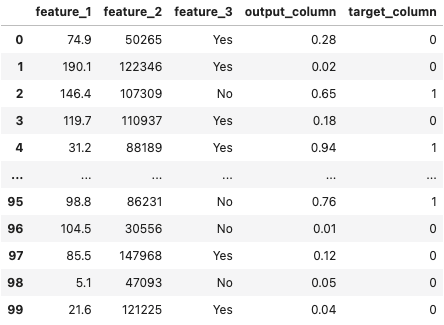
You then create a
fdl.Model object by inferring the column schema details from this DataFrame.
model.schema.
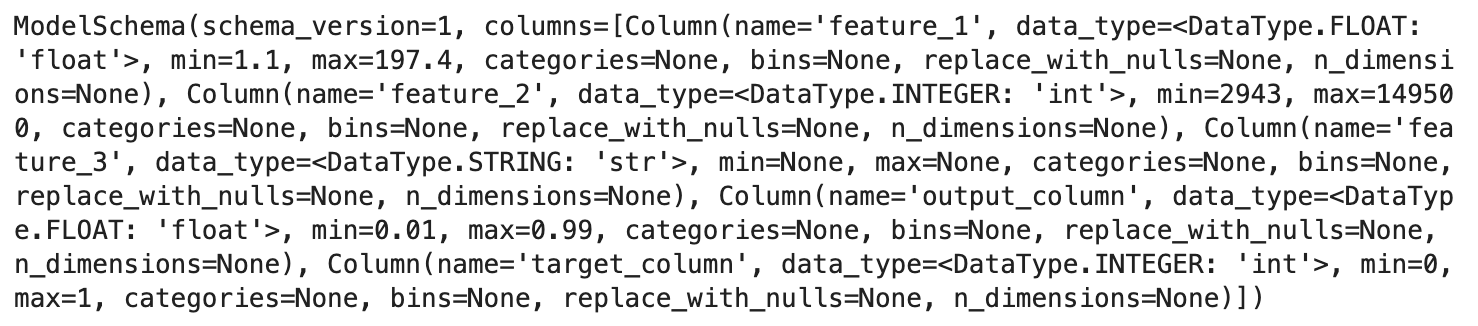
- The value range of
output_columnis set to[0.01, 0.99], when it should really be[0.0, 1.0]. - There are no possible values set for
feature_3. - The data type of
feature_3is set toDataType.STRING, when it should really beDataType.CATEGORY. - The histogram bins for a numerical column may need to be adjusted for better distribution analysis (e.g., quantile-based instead of uniform).
Modifying the Value Range
Let’s say we want to modify the range ofoutput_column in the above fdl.Model object to be [0.0, 1.0].
You can do this by setting the min and max of the output_column column.
Modifying the Histogram Bins
By default, Fiddler auto-generates 10 uniform bins for numerical columns based on the column’s min and max values. You can customize these bins to better represent your data distribution — for example, using quantile-based bins or domain-specific ranges.- Be strictly monotonically increasing
- Start at the column’s
minvalue - End at the column’s
maxvalue - Have at least 2 and at most 16 boundary values (1 to 15 bins)
Custom bins affect how feature distributions and drift metrics (PSI, JSD) are computed. Bins are used for histogram bucketing in data drift calculations.
Modifying the Possible Values
Let’s say we want to modify the possible values offeature_3 to be [‘Yes’, ‘No’].
You can do this by setting the categories of the feature_3 column.
Modifying the Data Type
Let’s say we want to modify the data type offeature_3 to be DataType.CATEGORY.
You can do this by setting the data_type of the feature_3 column.