> ## Documentation Index
> Fetch the complete documentation index at: https://docs.fiddler.ai/llms.txt
> Use this file to discover all available pages before exploring further.
# Annotations
> Add human evaluation scores to individual spans in the Explorer to review and assess LLM application outputs alongside automated evaluators.
Annotations is in **Public Preview**. See [Feature Maturity Definitions](/reference/feature-maturity-definitions#public-preview) for what this means.
## Overview
Annotations let you attach human evaluation scores directly to individual spans in the [Explorer](/observability/agentic/trace-explorer). Use them to review LLM outputs, flag quality issues, and build a human-labeled dataset alongside your automated evaluators.
Each annotation records a **name**, a **score type** (numeric, boolean, categorical, or text), the score itself (in the type-appropriate field — see [Score Types](#score-types)), and an optional **Reason** field (`reasoning` in the API) explaining the assessment. Annotations are stored as scores with `source=human` and are accessible through both the UI and the `/v3/scores` REST API.
## Score Types
| Type | Value | API field | Example use case |
| --------------- | ---------------------------------------- | ----------------------------- | ----------------------------------------- |
| **Numeric** | Any number | `value` | Relevance score (0.0 to 1.0) |
| **Boolean** | True or False | `value` — send `1.0` or `0.0` | "Is this response correct?" |
| **Categorical** | A text label | `label` | Sentiment: positive, neutral, negative |
| **Text** | Free-form text (up to 65,536 characters) | `text` | Detailed feedback or a corrected response |
Every annotation also accepts an optional **Reason** field for free-text explanation of why the score was given.
***
## Using the UI
### Annotating a Span
Navigate to any GenAI Application Details page and select the **Explorer** tab.
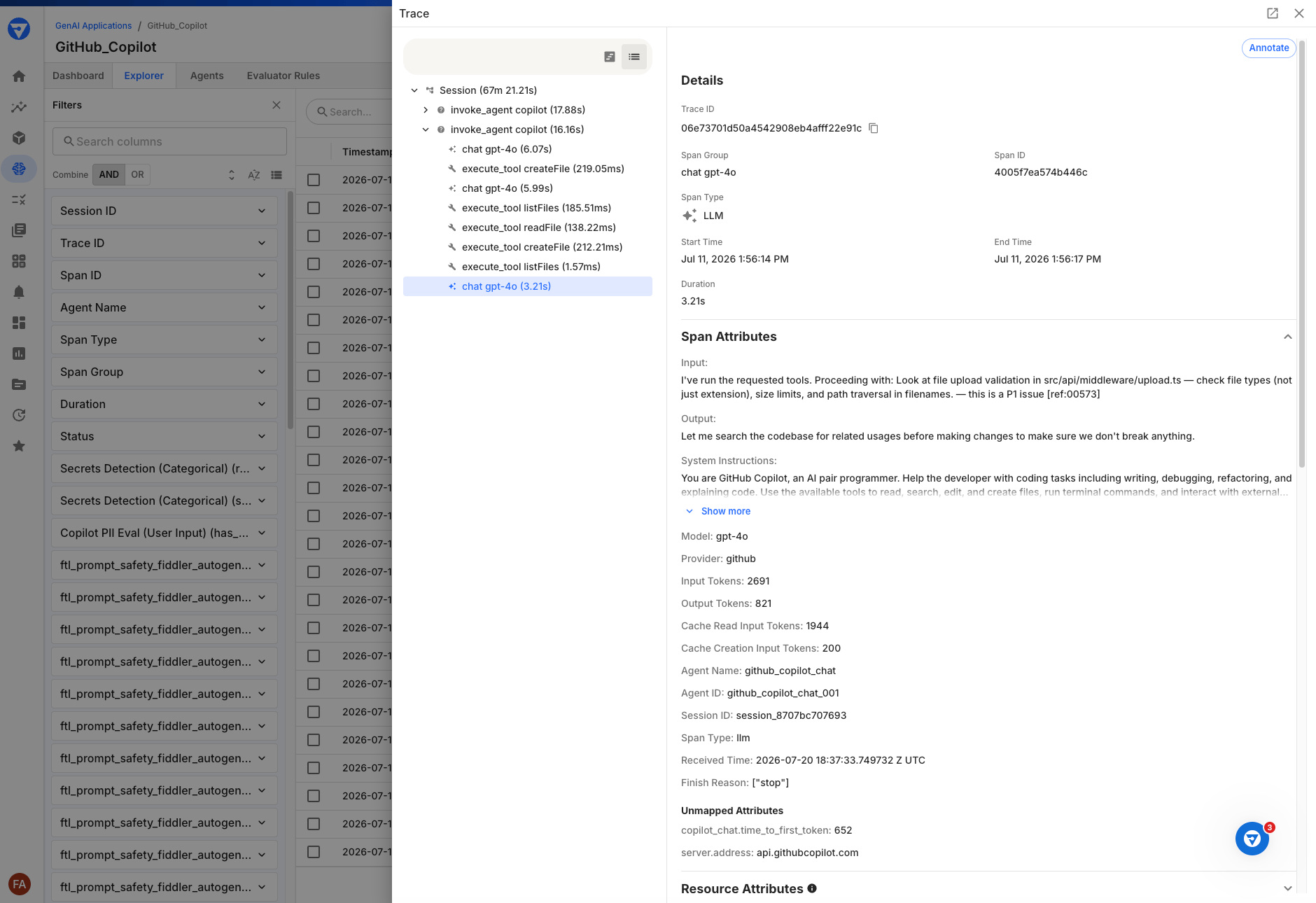
Click the **View Trace** icon on a span row to open the side drawer. The **Annotate** button appears in the top-right corner of the span detail panel.
 Click **Annotate** to open the **Add Annotation** dialog. Enter a **Name** (used as the score identifier across spans), select an **Annotation Type**, provide the score **Value**, and optionally add a **Reason**.
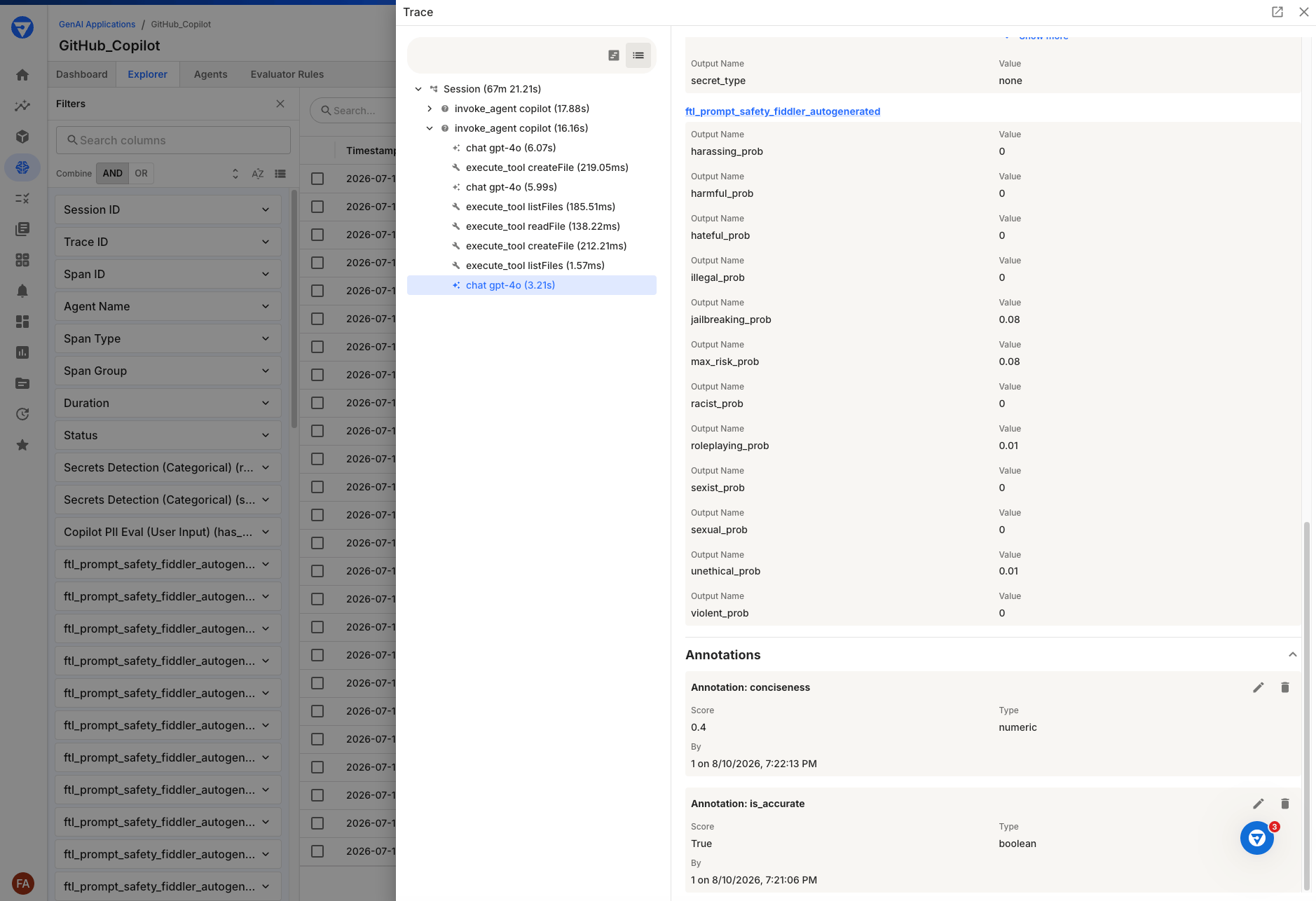 Use the same name on multiple spans to group scores — for example, annotating every span with a "correctness" score lets you compare correctness across your application.
Click **Add Annotation**. The annotation appears immediately in the **Annotations** section of the span detail panel.
### Viewing Annotations
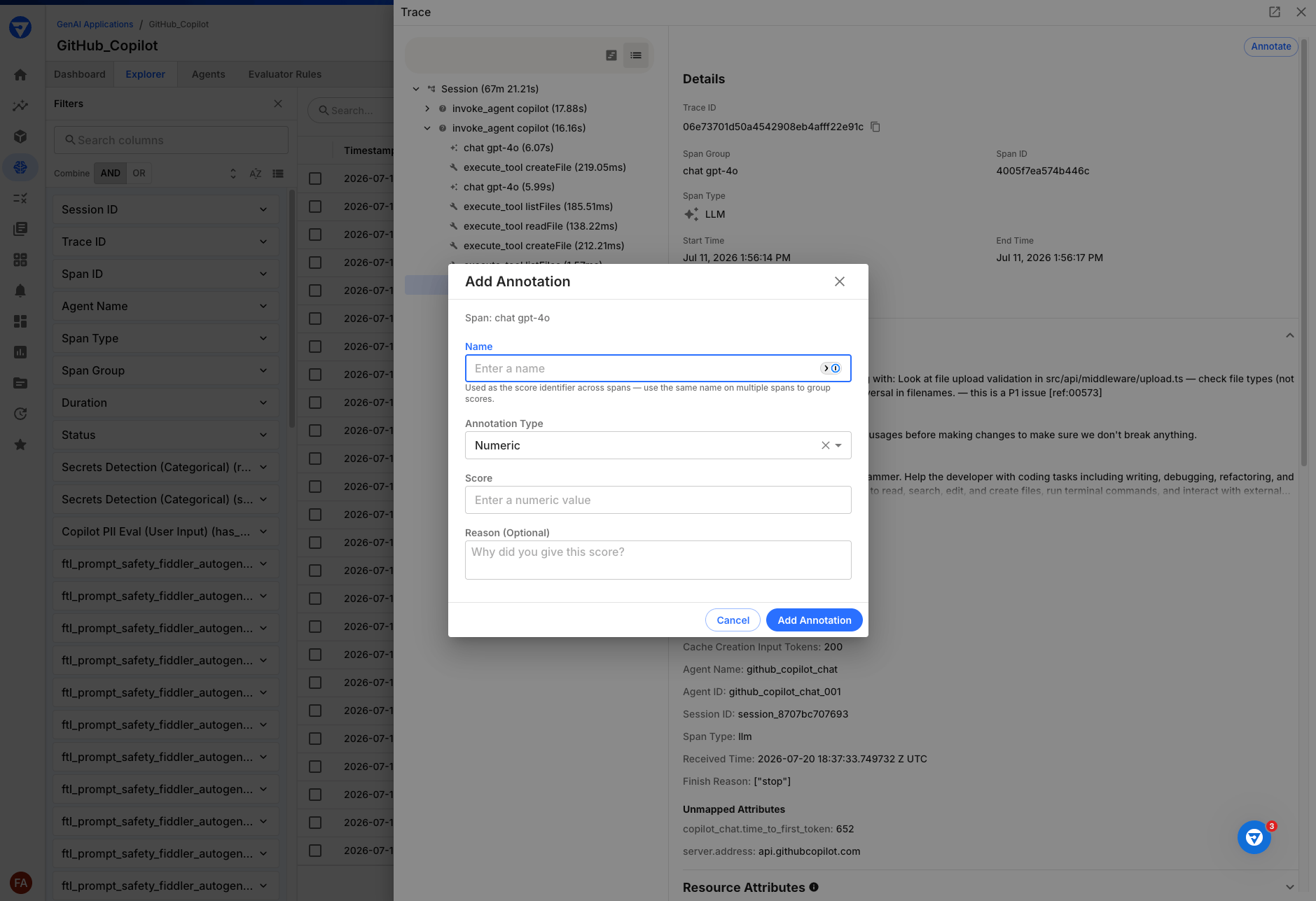
Existing annotations appear in the **Annotations** accordion section at the bottom of the span detail panel. Each annotation card displays the score name, value, type, annotator, and timestamp.
Use the same name on multiple spans to group scores — for example, annotating every span with a "correctness" score lets you compare correctness across your application.
Click **Add Annotation**. The annotation appears immediately in the **Annotations** section of the span detail panel.
### Viewing Annotations
Existing annotations appear in the **Annotations** accordion section at the bottom of the span detail panel. Each annotation card displays the score name, value, type, annotator, and timestamp.
 ### Editing and Deleting Annotations
* Click the **edit** (pencil) icon on an annotation card to update its value or reasoning. The score name and type cannot be changed — create a new annotation instead.
* Click the **delete** (trash) icon to remove an annotation. A confirmation dialog appears before deletion.
***
## API Access
Annotations are stored as scores with `source=human` via the `/v3/scores` API. You can create, list, update, and delete annotations programmatically.
### Quick Example
```bash theme={null}
curl -X POST https://your-fiddler-instance.com/v3/scores \
-H "Authorization: Bearer $FIDDLER_API_KEY" \
-H "Content-Type: application/json" \
-d '{
"application_id": "your-app-uuid",
"span_id": "target-span-id",
"name": "correctness",
"score_type": "numeric",
"source": "human",
"value": 0.9,
"reasoning": "Response accurately addressed the user question"
}'
```
### Endpoints
| Operation | Method | Endpoint | Reference |
| ----------- | -------- | ----------------------- | ----------------------------------------------------------------- |
| Create | `POST` | `/v3/scores` | [Create a score](/sdk-api/rest-api/scores/create-score) |
| List | `GET` | `/v3/scores` | [List scores](/sdk-api/rest-api/scores/list-scores) |
| Get | `GET` | `/v3/scores/{score_id}` | [Get a score](/sdk-api/rest-api/scores/get-score) |
| Update | `PATCH` | `/v3/scores/{score_id}` | [Update a score](/sdk-api/rest-api/scores/update-score) |
| Delete | `DELETE` | `/v3/scores/{score_id}` | [Delete a score](/sdk-api/rest-api/scores/delete-score) |
| Bulk create | `POST` | `/v3/scores/bulk` | [Bulk create scores](/sdk-api/rest-api/scores/bulk-create-scores) |
Filter by `source=human` to retrieve only human-created annotations. Evaluator-generated scores use `source=evaluator` and are read-only through this API.
***
## Related Resources
* [Explorer](/observability/agentic/trace-explorer) — the span exploration surface where annotations are created
* [Scores REST API](/sdk-api/rest-api/scores) — full API reference for creating and managing scores
* [Custom Metrics for Agentic Applications](/observability/agentic/custom-metrics) — define custom metrics over the same span data using FQL
* [Feature Maturity Definitions](/reference/feature-maturity-definitions#public-preview) — what public preview means
### Editing and Deleting Annotations
* Click the **edit** (pencil) icon on an annotation card to update its value or reasoning. The score name and type cannot be changed — create a new annotation instead.
* Click the **delete** (trash) icon to remove an annotation. A confirmation dialog appears before deletion.
***
## API Access
Annotations are stored as scores with `source=human` via the `/v3/scores` API. You can create, list, update, and delete annotations programmatically.
### Quick Example
```bash theme={null}
curl -X POST https://your-fiddler-instance.com/v3/scores \
-H "Authorization: Bearer $FIDDLER_API_KEY" \
-H "Content-Type: application/json" \
-d '{
"application_id": "your-app-uuid",
"span_id": "target-span-id",
"name": "correctness",
"score_type": "numeric",
"source": "human",
"value": 0.9,
"reasoning": "Response accurately addressed the user question"
}'
```
### Endpoints
| Operation | Method | Endpoint | Reference |
| ----------- | -------- | ----------------------- | ----------------------------------------------------------------- |
| Create | `POST` | `/v3/scores` | [Create a score](/sdk-api/rest-api/scores/create-score) |
| List | `GET` | `/v3/scores` | [List scores](/sdk-api/rest-api/scores/list-scores) |
| Get | `GET` | `/v3/scores/{score_id}` | [Get a score](/sdk-api/rest-api/scores/get-score) |
| Update | `PATCH` | `/v3/scores/{score_id}` | [Update a score](/sdk-api/rest-api/scores/update-score) |
| Delete | `DELETE` | `/v3/scores/{score_id}` | [Delete a score](/sdk-api/rest-api/scores/delete-score) |
| Bulk create | `POST` | `/v3/scores/bulk` | [Bulk create scores](/sdk-api/rest-api/scores/bulk-create-scores) |
Filter by `source=human` to retrieve only human-created annotations. Evaluator-generated scores use `source=evaluator` and are read-only through this API.
***
## Related Resources
* [Explorer](/observability/agentic/trace-explorer) — the span exploration surface where annotations are created
* [Scores REST API](/sdk-api/rest-api/scores) — full API reference for creating and managing scores
* [Custom Metrics for Agentic Applications](/observability/agentic/custom-metrics) — define custom metrics over the same span data using FQL
* [Feature Maturity Definitions](/reference/feature-maturity-definitions#public-preview) — what public preview means