# PagerDuty

Fiddler offers powerful alerting tools for monitoring models. By integrating with\
PagerDuty services, you gain the ability to trigger PagerDuty events within your monitoring\
workflow.

> 📘 If your organization has already integrated with PagerDuty, then you may skip to the [Setup: In Fiddler](#setup-in-fiddler) section to learn more about setting up PagerDuty within Fiddler.

### Setup: In PagerDuty

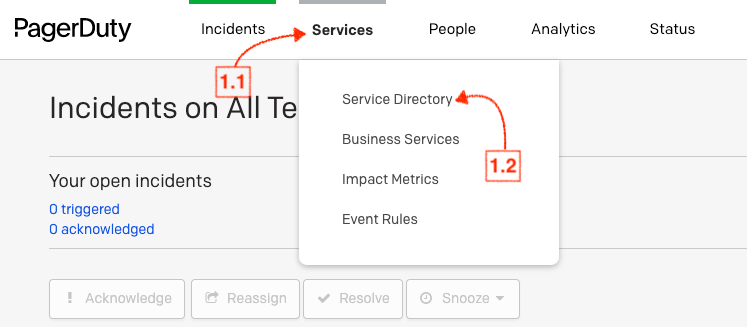
1. Within your PagerDuty Team, navigate to **Services** → **Service Directory**.

![](https://1800696242-files.gitbook.io/~/files/v0/b/gitbook-x-prod.appspot.com/o/spaces%2Fkcq97TxAnbTVaNJOQHbQ%2Fuploads%2Fgit-blob-fa54cf0bc607a013f565a39b46d8bb4af9976155%2F0ae47bb-pagerduty-1.png?alt=media)

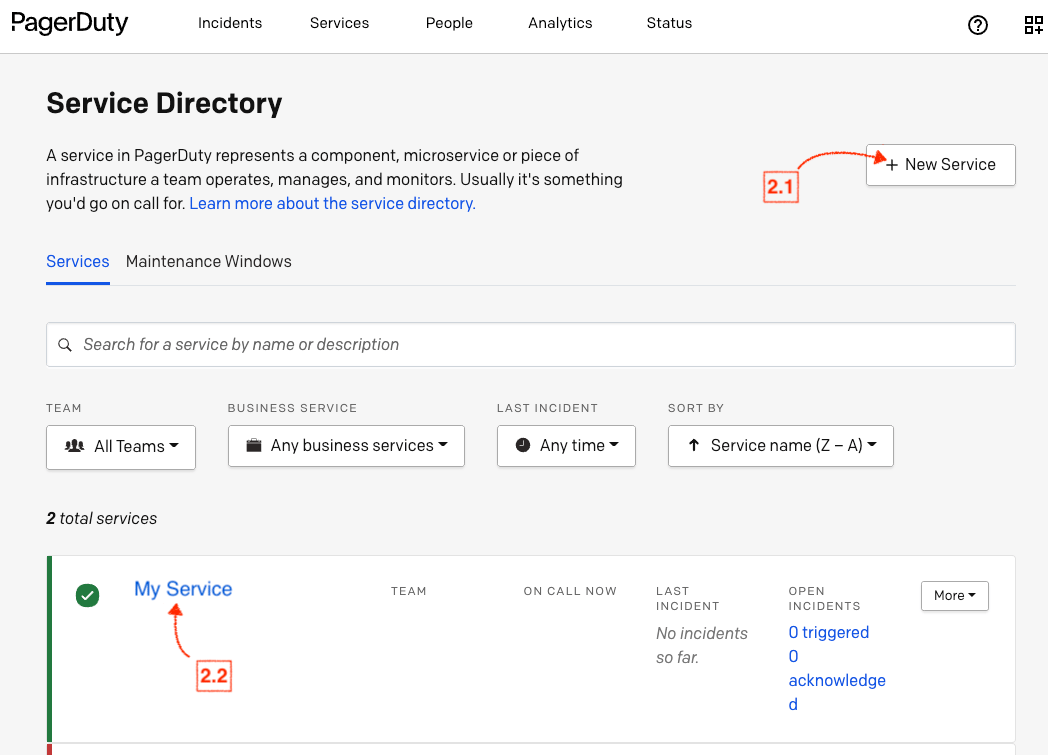
2. Within the Service Directory:
   * If you are creating a new service for integration, select **+New Service** and follow the prompts to create your service.
   * Click the **name of the service** you want to integrate with.

![](https://1800696242-files.gitbook.io/~/files/v0/b/gitbook-x-prod.appspot.com/o/spaces%2Fkcq97TxAnbTVaNJOQHbQ%2Fuploads%2Fgit-blob-e61ccf48d23cb3c83f6fcc2883bf5054f4aba1fa%2F956dbdf-pagerduty-2.png?alt=media)

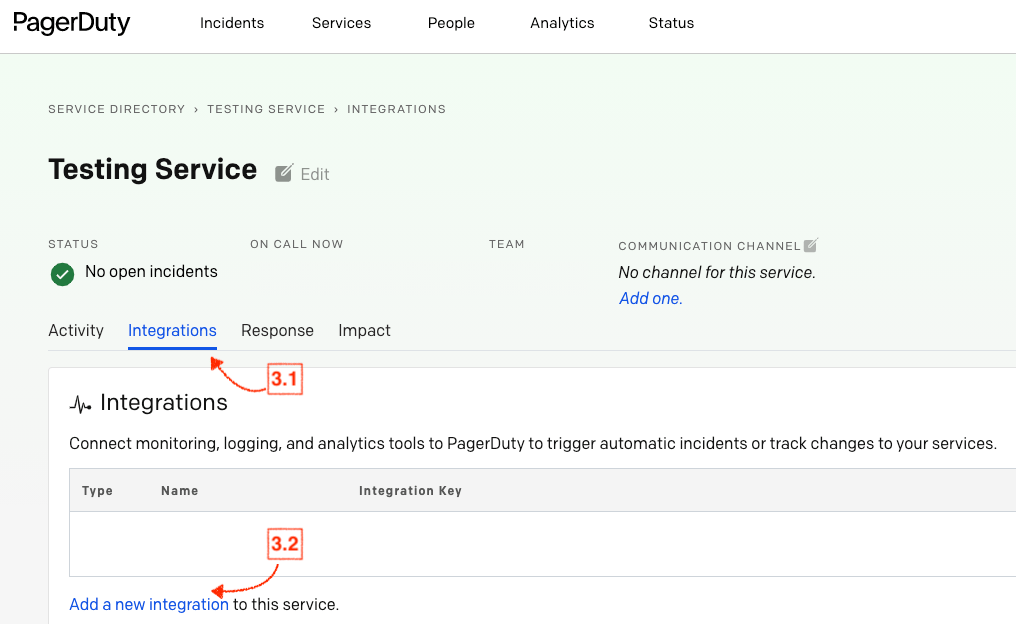
3. Navigate to **Integrations** within your service, and select **Add a new integration to this service**.

![](https://1800696242-files.gitbook.io/~/files/v0/b/gitbook-x-prod.appspot.com/o/spaces%2Fkcq97TxAnbTVaNJOQHbQ%2Fuploads%2Fgit-blob-d43a6a0a5d0be8ab420d09983a4d42ec029c3766%2Fca2e4c2-pagerduty-3.png?alt=media)

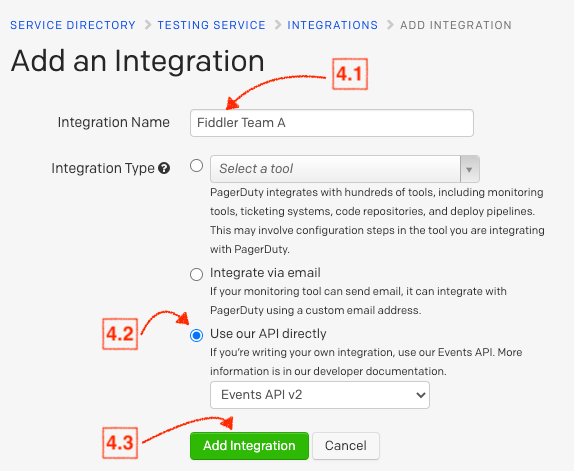
4. Enter an **Integration Name**, and under **Integration Type** select the option **Use our API directly**. Then, select the **Add Integration** button to save your new integration. You will be redirected to the Integrations page for your service.
![](https://1800696242-files.gitbook.io/~/files/v0/b/gitbook-x-prod.appspot.com/o/spaces%2Fkcq97TxAnbTVaNJOQHbQ%2Fuploads%2Fgit-blob-fd8d69538783293655cfc078f0604e064b554963%2F0f5d5ae-pagerduty-4.png?alt=media)

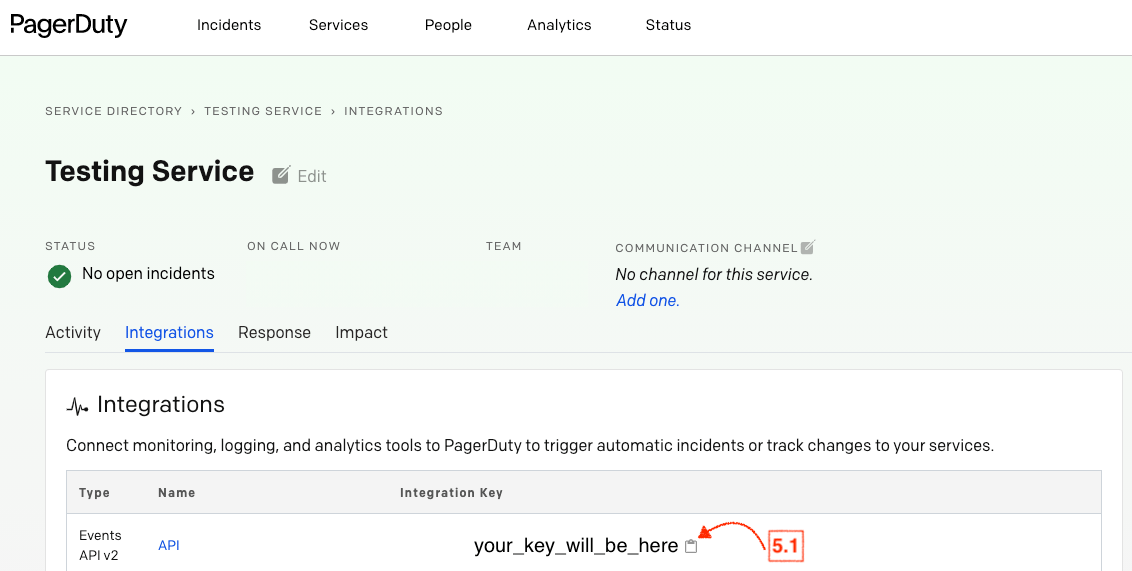
5. Copy the **Integration Key** for your new integration.

![](https://1800696242-files.gitbook.io/~/files/v0/b/gitbook-x-prod.appspot.com/o/spaces%2Fkcq97TxAnbTVaNJOQHbQ%2Fuploads%2Fgit-blob-23c1eac7622dbd8e352f379a7bd43f5b9de6470d%2Fe144e08-pagerduty-5.png?alt=media)

### Setup: In Fiddler

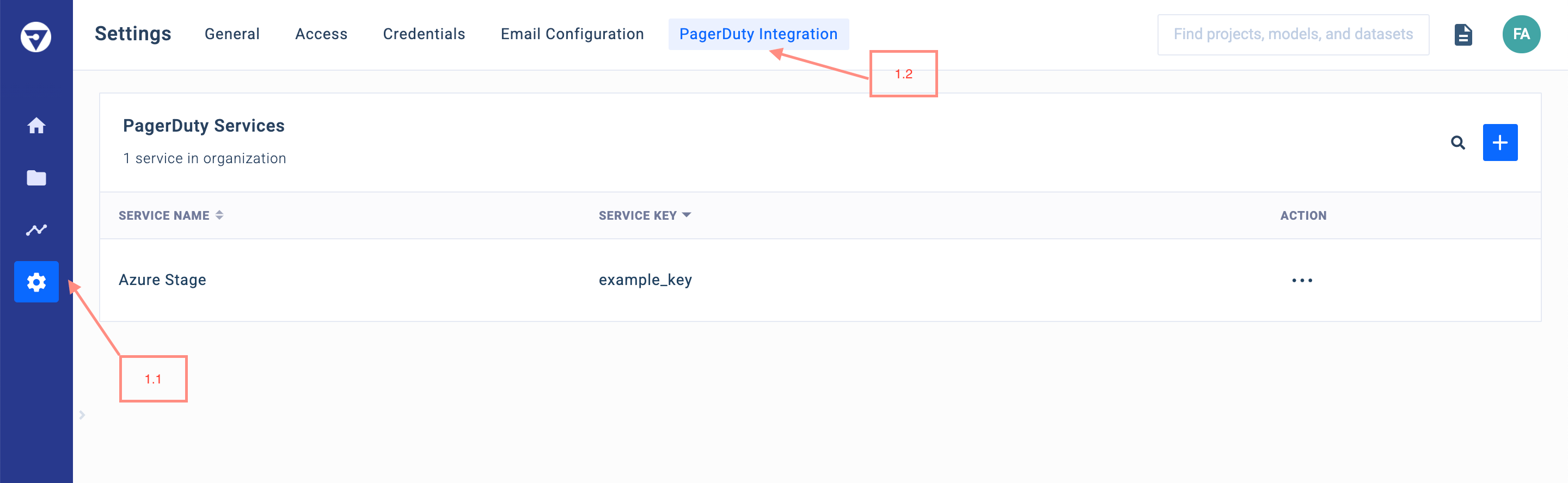
1. Within **Fiddler**, navigate to the **Settings** page, and then to the **PagerDuty Integration** menu. If your organization **already has a PagerDuty service integrated with Fiddler**, you will be able to find it in the list of services.
![](https://1800696242-files.gitbook.io/~/files/v0/b/gitbook-x-prod.appspot.com/o/spaces%2Fkcq97TxAnbTVaNJOQHbQ%2Fuploads%2Fgit-blob-fead34b50c7e31bf898dd2bee04cd4c00db298e6%2F8de1a6b-pagerduty-setup-f-1.png?alt=media)

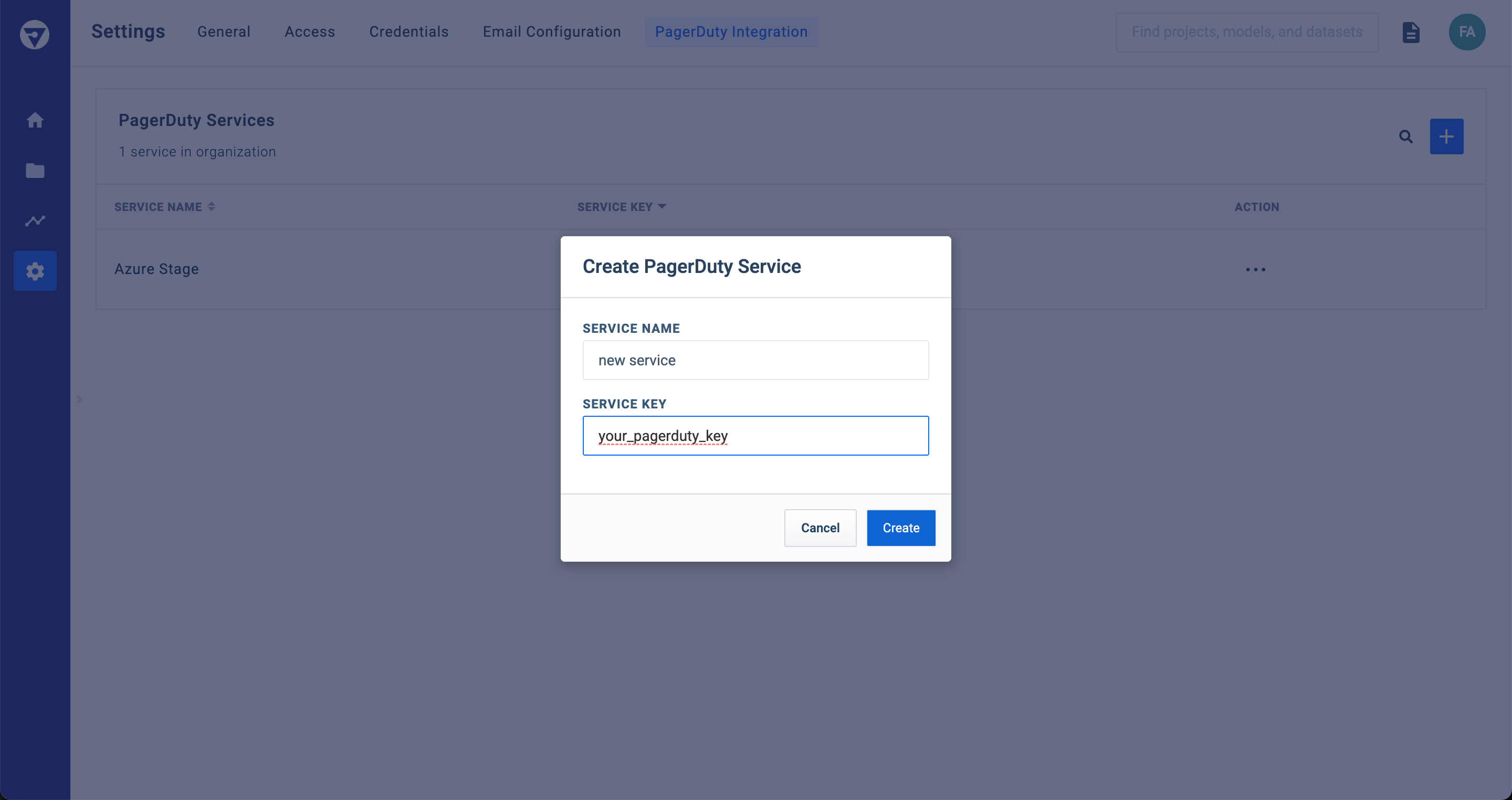
2. If you are looking to integrate with a new service, select the **`+`** box on the top right. Then, enter the name of your service, as well as the Integration Key copied from the end of the [Setup: In PagerDuty](#setup-in-pagerduty) section above. After creation, confirm that your new entry is now in the list of available services.
![](https://1800696242-files.gitbook.io/~/files/v0/b/gitbook-x-prod.appspot.com/o/spaces%2Fkcq97TxAnbTVaNJOQHbQ%2Fuploads%2Fgit-blob-d712fbfcbc83340c460b06803d49fe0640ad86ed%2F9febb10-pagerduty-setup-f-2.png?alt=media)

> 🚧 Creating, editing, and deleting these services is an **ADMINSTRATOR**-only privilege. Please contact an **ADMINSTRATOR** within your organization to setup any new PagerDuty services

### PagerDuty Alerts in Fiddler

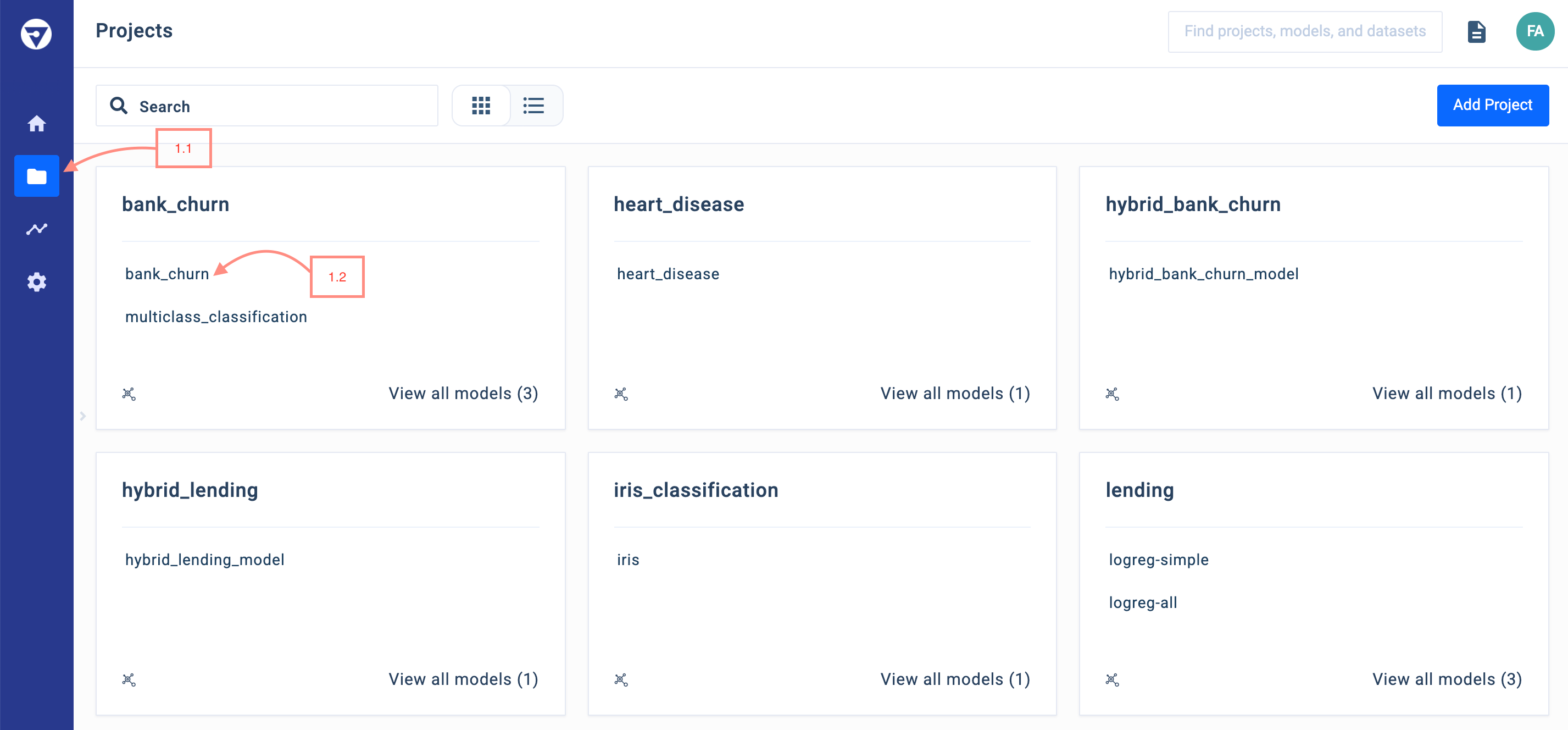
1. Within the **Projects** page, select the model you wish to use with PagerDuty.
![](https://1800696242-files.gitbook.io/~/files/v0/b/gitbook-x-prod.appspot.com/o/spaces%2Fkcq97TxAnbTVaNJOQHbQ%2Fuploads%2Fgit-blob-52916f870690bf26798bbf260b3b1a96ca3e5f64%2Fd9ad82e-pagerduty-fiddler-1.png?alt=media)

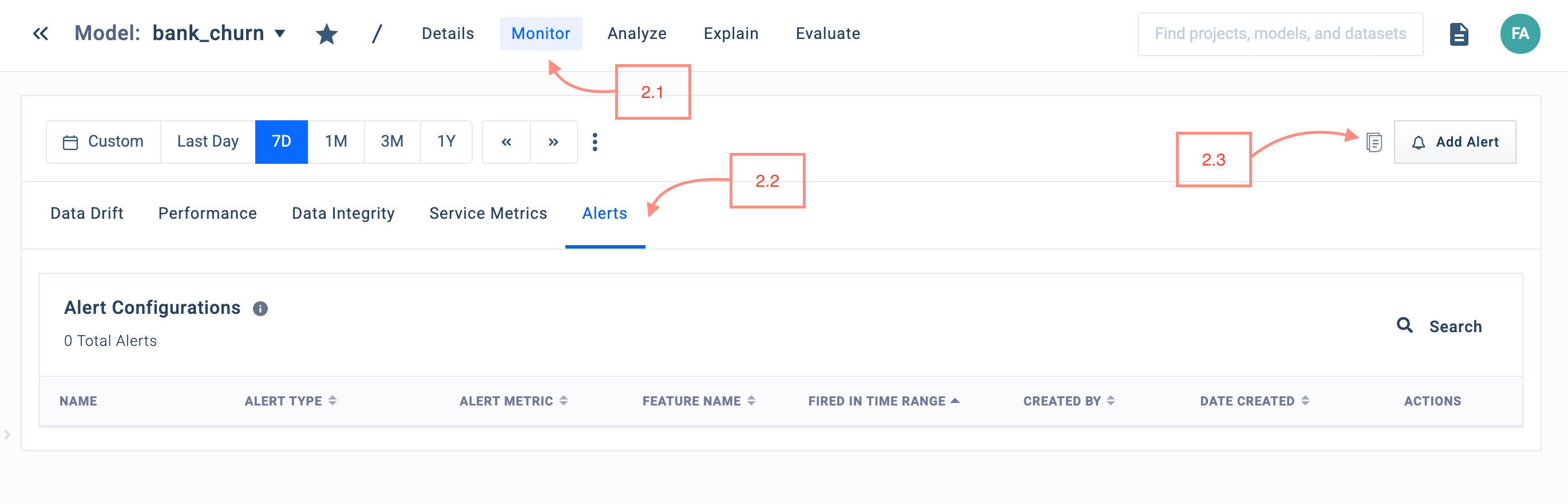
2. Select **Monitor** → **Alerts** → **Add Alert**.

![](https://1800696242-files.gitbook.io/~/files/v0/b/gitbook-x-prod.appspot.com/o/spaces%2Fkcq97TxAnbTVaNJOQHbQ%2Fuploads%2Fgit-blob-951e7c02151a57636e607f4e9c564aef1ffbd38c%2Fb7118f0-pagerduty-fiddler-2.png?alt=media)

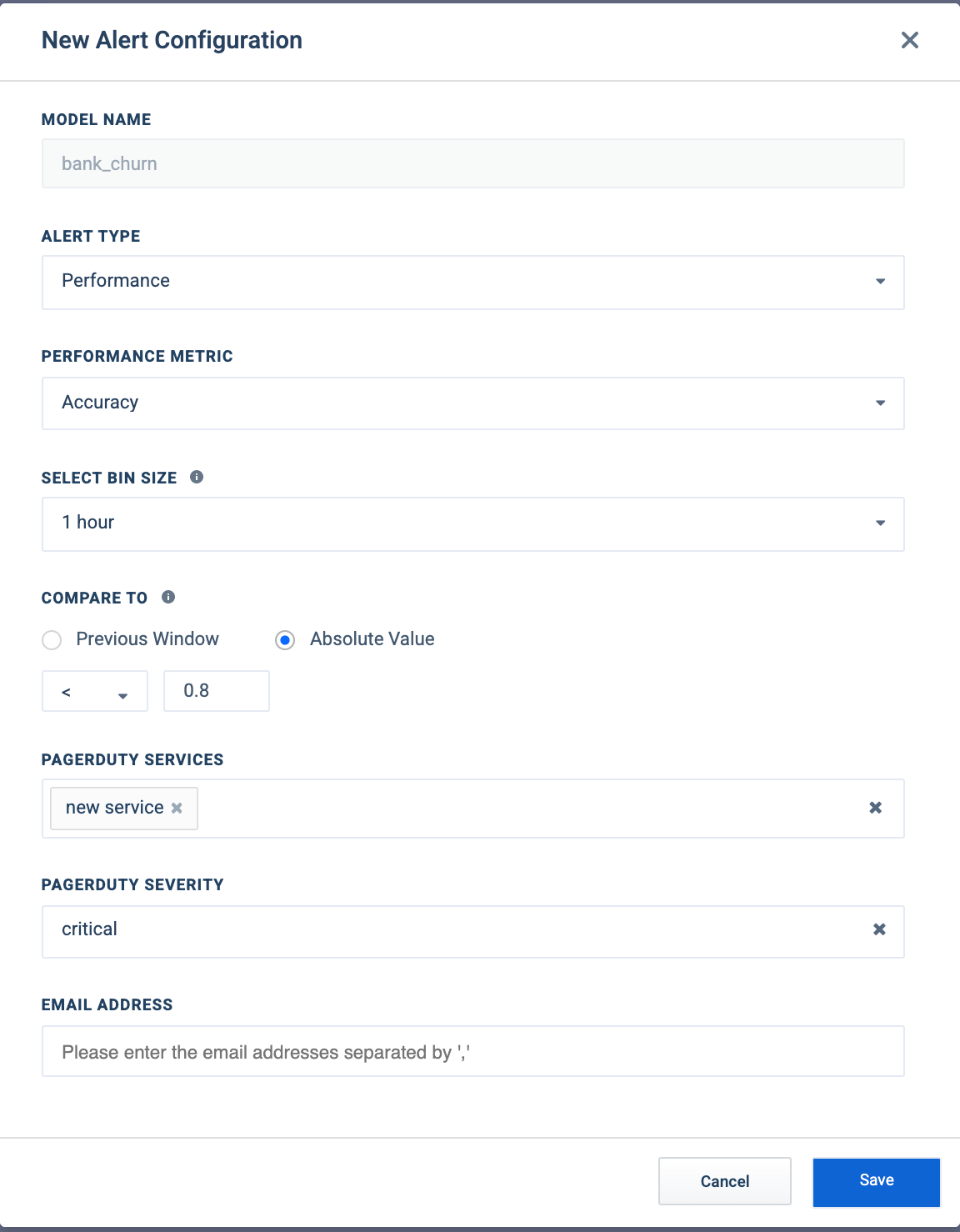
3. Enter the condition you would like to alert on, and under **PagerDuty Services**, select all services you would like the alert to trigger for. Additionally, select the **Severity** of this alert, and hit **Save**.

![](https://1800696242-files.gitbook.io/~/files/v0/b/gitbook-x-prod.appspot.com/o/spaces%2Fkcq97TxAnbTVaNJOQHbQ%2Fuploads%2Fgit-blob-09f7cd6a2c209601a5d2131e7f5cd14a893630fd%2F8fbffde-pagerduty-fiddler-3.png?alt=media)

4. After creation, the alert will now trigger for the specified PagerDuty services.

> 📘 Info
>
> Check out the [alerts documentation](https://app.gitbook.com/s/jZC6ysdlGhDKECaPCjwm/client-library-reference/alerts-with-fiddler-client) for more information on setting up alerts.

### FAQ

**Can Fiddler integrate with multiple PagerDuty services?**

* Yes. So long as the service is present within **Settings** → **PagerDuty Services**, anyone within your organization can select that service to be a recipient for an alert.