> ## Documentation Index
> Fetch the complete documentation index at: https://docs.fiddler.ai/llms.txt
> Use this file to discover all available pages before exploring further.
# Golden Datasets
> Build a golden dataset from real production traffic by promoting spans into a Fiddler Experiments dataset, then replay it against every change to catch regressions.
A **golden dataset** is a curated, stable set of test cases that every experiment runs against.
The strongest ones are built from traffic your application has actually served, not from invented examples.
Golden Datasets let you promote real spans — the slow ones, the ones a guardrail flagged, the ones a user complained about — into a dataset you can replay against every future change.
Each promoted span becomes a dataset item, so a bug you saw in production becomes a permanent regression test.
This page covers building a golden dataset with the Fiddler Evals SDK.
The same workflow is available in the UI through the **Add to Dataset** action in the [Explorer](/observability/agentic/trace-explorer).
## What You'll Learn
* Discover which attribute keys exist on your application's spans
* Find the spans worth promoting into a golden dataset
* Map span attributes onto dataset fields
* Add the selected spans as dataset items
**Time to complete**: \~15 minutes
## Prerequisites
* An [application](/getting-started/genai-application-onboarding) that is already receiving traces
* A Fiddler API key from [**Settings** > **Credentials**](/reference/administration/settings#credentials)
* Python 3.10 or later
* **Fiddler Evals SDK**: `pip install fiddler-evals`
If you prefer a notebook, open the fully worked example in [Google Colab](https://colab.research.google.com/github/fiddler-labs/fiddler-examples/blob/main/quickstart/latest/Fiddler_Quickstart_Golden_Datasets.ipynb) or download it from [GitHub](https://github.com/fiddler-labs/fiddler-examples/blob/main/quickstart/latest/Fiddler_Quickstart_Golden_Datasets.ipynb).
## Start in the UI
**The Explorer is the fastest way to build a golden dataset, and the recommended one for most cases.**
Select the spans you want and choose **Add to Dataset**. A three-step dialog walks you through picking a dataset, mapping fields, and reviewing the result before anything is written.
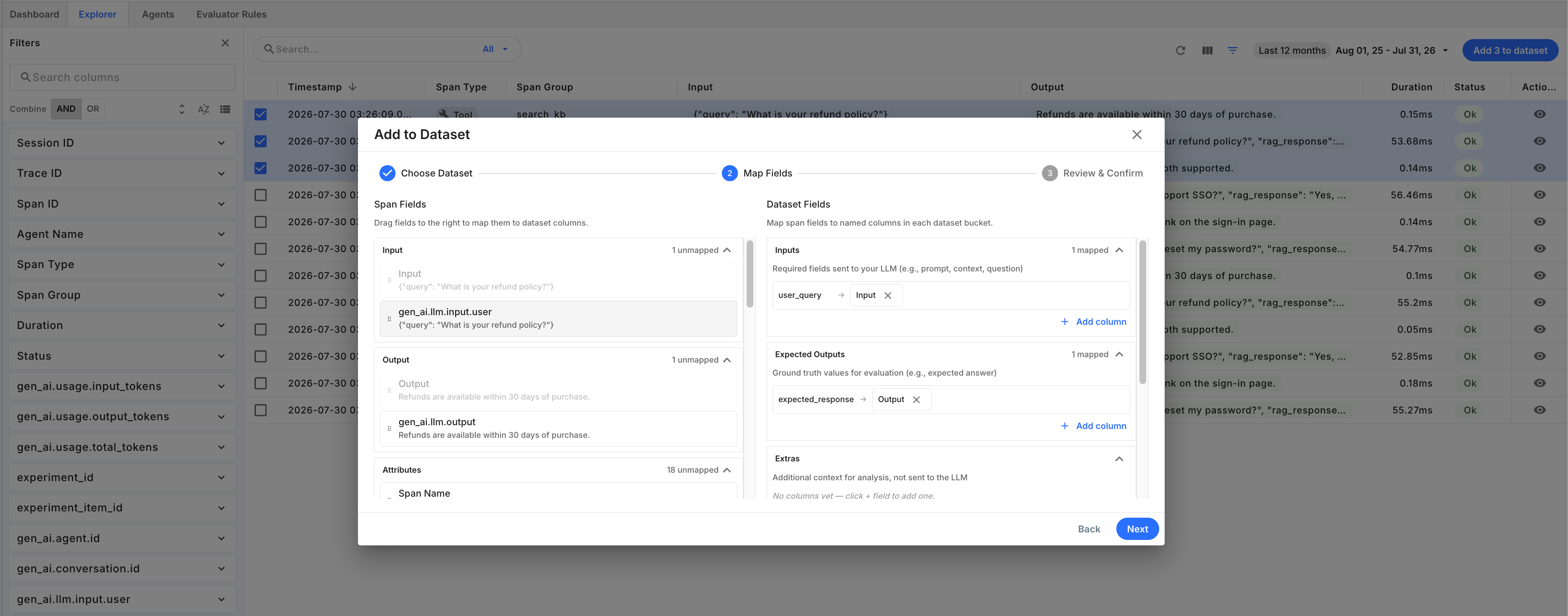 Mapping is drag-and-drop between the span fields on the left and the dataset buckets on the right, and each bucket says what it's for:
| Bucket | Holds |
| -------------------- | --------------------------------------------------- |
| **Inputs** | Fields sent to your LLM — prompt, context, question |
| **Expected Outputs** | Ground truth for evaluation — the expected answer |
| **Extras** | Context for analysis, not sent to the LLM |
Span fields are picked from a list, so you cannot mistype an attribute key — the most common way the SDK path fails.
Use the SDK instead when you need the workflow to be **repeatable**: curating on a schedule, promoting spans from CI, or parameterizing selection across applications.
The rest of this page covers that path.
## How It Works
Spans and dataset items have different shapes.
A span is a flat bag of OpenTelemetry attributes;
a dataset item has four named buckets — `inputs`, `expected_outputs`, `metadata`, and `extras`.
Adding spans to a dataset is therefore a projection, and you supply the projection as a **field mapping**.
Attribute keys are stored exactly as your instrumentation sent them;
[semantic mappings](/concepts/semantic-mappings) resolve framework-specific naming server-side without renaming what is stored.
The workflow has four steps:
Query for the spans you want, and collect their `trace_id` and `span_id` pairs.
Ask which attribute keys those spans carry, and how often.
Map each dataset field to the span attribute that populates it.
Fiddler resolves each span, applies the mapping, and writes one dataset item per span.
Fiddler resolves spans server-side from the IDs you send.
Span *content* never round-trips through your client, and the application is derived from the dataset — not from your request — so a mapping cannot pull attributes out of an application you do not have access to.
## Step 1: Select the Spans to Promote
Pick the spans first, then discover what's on them.
Doing it the other way around scans your whole window and can surface attribute keys that aren't present on the spans you actually promote — map one of those and you get a dataset of blank items.
Connect, then choose a time window:
```python theme={null}
from datetime import datetime, timedelta, timezone
from fiddler_evals import Application, Project, init
init(url='https://your-org.fiddler.ai', token='your-api-key')
project = Project.get_by_name(name='support')
application = Application.get_by_name(
name='support-agent',
project_id=project.id,
)
end_time = datetime.now(timezone.utc)
start_time = end_time - timedelta(days=7)
```
`add_items_from_spans()` takes explicit `(trace_id, span_id)` pairs, so fetch some spans.
Use the [`POST /v3/spans/query`](/sdk-api/rest-api/spans/query-spans) endpoint, which returns spans newest-first.
The Evals SDK does not yet include a span-query method,
so this helper wraps the REST endpoint directly.
```python theme={null}
import requests
def query_spans(
url, token, application_id, start_time, end_time, filter_=None, page_size=200
):
"""Return spans matching a filter, newest first.
Wraps POST /v3/spans/query. See /sdk-api/rest-api/spans/query-spans.
"""
payload = {
'application_id': str(application_id),
'start_time': start_time.isoformat(),
'end_time': end_time.isoformat(),
'page_size': page_size, # server maximum is 200
}
if filter_ is not None:
payload['filter'] = filter_.model_dump(mode='json')
response = requests.post(
f'{url}/v3/spans/query',
headers={'Authorization': f'Bearer {token}'},
json=payload,
timeout=60,
)
response.raise_for_status()
return response.json()['data']['items']
```
`page_size` maxes out at 200, matching the per-call span limit on `add_items_from_spans()`, so one page maps cleanly to one call.
To promote more than 200 spans you must advance `offset` yourself and call `add_items_from_spans()` once per page.
### Narrow the Selection
`filter` is a structured tree over span fields. Field names are namespaced:
| Namespace | Example | Matches |
| ----------------- | -------------------------------------------------------- | ------------------------------- |
| `Span::` | `Span::span_type`, `Span::duration`, `Span::status_code` | Reserved span columns |
| `SpanAttribute::` | `SpanAttribute::gen_ai.usage.total_tokens` | Any user-defined span attribute |
| `Evaluator::` | `Evaluator::Safety::Is Toxic` | An evaluator rule's output |
[Span and Resource Attributes](/integrations/agentic-ai/attributes) catalogs the indexed span attributes and their value types,
including whether each is reached through a fast `Span::` column or through `SpanAttribute::`.
`search` is a case-insensitive substring match over span content, AND-ed with `filter`.
It matches the content attributes Fiddler full-text indexes, such as `gen_ai.llm.input.user`.
A filter tree is limited to 3 levels of nesting and 10 rules total.
A `search` query must be 3–64 characters.
`Span::duration` is in nanoseconds.
Keep the filter in a variable — Step 2 reuses it so discovery describes exactly this selection:
```python theme={null}
from fiddler_evals import (
OperatorType,
QueryCondition,
QueryRule,
SpanReference,
)
# LLM spans slower than 2 seconds.
active_filter = QueryCondition(
rules=[
QueryRule(
field='Span::span_type',
operator=OperatorType.EQUAL,
value='llm',
),
QueryRule(
field='Span::duration',
operator=OperatorType.GREATER,
value=2_000_000_000, # nanoseconds
),
]
)
spans = query_spans(
url='https://your-org.fiddler.ai',
token='your-api-key',
application_id=application.id,
start_time=start_time,
end_time=end_time,
filter_=active_filter,
)
span_refs = [
SpanReference(trace_id=span['trace_id'], span_id=span['span_id'])
for span in spans
]
print(f'Selected {len(span_refs)} spans')
```
```text Expected output theme={null}
Selected 47 spans
```
Pass `filter_=None` to select every span in the window.
## Step 2: Discover the Attributes on Those Spans
Now that the selection is fixed, ask what those spans carry.
`get_span_fields()` returns every attribute key with a coverage count, plus any evaluator outputs recorded on them.
Passing `active_filter` scopes discovery to exactly the spans you selected, so the keys you see are the keys you can map.
```python theme={null}
fields = application.get_span_fields(
start_time=start_time,
end_time=end_time,
filter=active_filter,
)
print(f'{fields.total_spans} spans scanned (sampled={fields.sampled})')
for attribute in sorted(fields.span_attributes, key=lambda a: -a.count):
print(f' {attribute.key}: {attribute.count}')
```
```text Expected output theme={null}
47 spans scanned (sampled=False)
gen_ai.llm.input.user: 47
gen_ai.request.model: 47
fiddler.span.type: 47
gen_ai.llm.output: 46
support.ticket_id: 33
```
The `count` is what makes this useful: an attribute present on 33 of 47 spans is a poor choice for a required input field, because the spans missing it produce an empty string rather than an error.
`get_span_fields()` scans at most 10,000 matching spans.
Above that it sets `sampled=True` and the counts describe a sample rather than the full set.
Narrow the time range or the filter when you need exact coverage.
## Step 3: Define a Field Mapping
A `FieldMapping` maps *dataset field name* to *span attribute key*, bucket by bucket.
Every bucket is optional and defaults to empty.
The mapping is not stored anywhere — pass it on every call, or keep it in version control alongside your evaluation code.
```python theme={null}
from fiddler_evals import Dataset, FieldMapping
dataset = Dataset.get_or_create(
name='support-agent-regressions',
application_id=application.id,
description='Toxic responses caught in production, promoted for replay',
)
mapping = FieldMapping(
inputs={'user_query': 'gen_ai.llm.input.user'},
expected_outputs={'expected_response': 'gen_ai.llm.output'},
metadata={
'model': 'gen_ai.request.model',
'ticket_id': 'support.ticket_id',
},
)
```
Read each entry as "populate the dataset field on the left from the span attribute on the right."
Span attribute keys are stored **verbatim** — the key your instrumentation set is the key you map.
Spans ingested before Fiddler 26.16 instead carry legacy `fiddler.contents.*`, `fiddler.span.system.*`, or `fiddler.span.user.*` prefixed keys,
so a time window that spans the upgrade can mix both forms.
The discovery output always shows the stored form.
Keys are matched **exactly**, and an unresolved key yields an empty string rather than an error.
A near-miss therefore produces a dataset of blank items alongside a successful `items_created` count.
Always copy keys from the [Step 2](#step-2-discover-the-attributes-on-those-spans) output, and verify the first promoted item is populated.
Verbatim key storage requires Fiddler 26.16 or later,
but because you copy keys from the discovery output,
the workflow stays correct on earlier deployments that still store the prefixed keys.
Note what each bucket is for when you promote production spans:
* **`inputs`** is what your task replays. Your task function receives this bucket as its `inputs` argument, so `inputs['user_query']` is how it reads the captured query.
* **`expected_outputs`** is the reference to compare against. Promoting the production response here captures "what we shipped last time," which is what makes the dataset a regression baseline.
* **`metadata`** and **`extras`** carry context you want to slice results by, but that the task does not consume.
To align a mapping with a dataset that already has items, inspect its schema first:
```python theme={null}
schema = dataset.get_schema()
print(f'{schema.total_items} items (sampled={schema.sampled})')
for field in schema.inputs:
print(f' inputs.{field.key}: {field.data_type} ({field.count})')
```
Reusing the existing field names keeps the dataset consistent, which matters because experiment tasks bind to inputs by name.
## Step 4: Add the Items
```python theme={null}
result = dataset.add_items_from_spans(
spans=span_refs,
mapping=mapping,
start_time=start_time,
end_time=end_time,
)
print(f'Created {result.items_created} dataset items')
print(result.item_ids[:3])
```
```text Expected output theme={null}
Created 47 dataset items
[UUID('3f2b...'), UUID('9c41...'), UUID('be07...')]
```
`start_time` and `end_time` must cover the spans you reference — Fiddler uses them to bound the lookup, and a span outside the window is treated as missing.
The call is **all-or-nothing**.
If any span cannot be resolved, Fiddler writes nothing and returns `422` with a `SpanNotFound` entry per unresolved span.
That makes retries safe: a failed call leaves the dataset untouched, so you can fix the references and call again without creating duplicates.
## Limits
| Limit | Value | Applies to |
| --------------------------------- | --------------- | ---------------------------------------- |
| Spans per call | 200 | `add_items_from_spans()` |
| Items per dataset | 10,000 | Total across all sources |
| Spans scanned for field discovery | 10,000 | `get_span_fields()`, sets `sampled=True` |
| Filter nesting depth | 3 levels | `filter` |
| Filter rules | 10 | `filter` |
| Search query length | 3–64 characters | `search` |
| Span query page size | 200 | `POST /v3/spans/query` |
To add more than 200 spans, page through your span query and call `add_items_from_spans()` once per batch.
Each call is independent, so a batch that fails does not roll back batches that already succeeded.
The per-call span limit and the per-dataset item limit can vary by deployment.
Check with your Fiddler administrator if your instance behaves differently.
## Next Steps
* [Run an experiment](/evaluate-and-test/evals-sdk-quick-start) against the golden dataset you just built
* [Capture traces during experiments](/evaluate-and-test/experiment-trace-capture) to debug what your task did on each item
* [Span and Resource Attributes](/integrations/agentic-ai/attributes) — the full catalog of filterable fields
* [Query spans REST reference](/sdk-api/rest-api/spans/query-spans)
* [Bulk add spans to dataset REST reference](/sdk-api/rest-api/evals/bulk-add-spans-to-dataset)
* [`Dataset` SDK reference](/sdk-api/evals/dataset)
Mapping is drag-and-drop between the span fields on the left and the dataset buckets on the right, and each bucket says what it's for:
| Bucket | Holds |
| -------------------- | --------------------------------------------------- |
| **Inputs** | Fields sent to your LLM — prompt, context, question |
| **Expected Outputs** | Ground truth for evaluation — the expected answer |
| **Extras** | Context for analysis, not sent to the LLM |
Span fields are picked from a list, so you cannot mistype an attribute key — the most common way the SDK path fails.
Use the SDK instead when you need the workflow to be **repeatable**: curating on a schedule, promoting spans from CI, or parameterizing selection across applications.
The rest of this page covers that path.
## How It Works
Spans and dataset items have different shapes.
A span is a flat bag of OpenTelemetry attributes;
a dataset item has four named buckets — `inputs`, `expected_outputs`, `metadata`, and `extras`.
Adding spans to a dataset is therefore a projection, and you supply the projection as a **field mapping**.
Attribute keys are stored exactly as your instrumentation sent them;
[semantic mappings](/concepts/semantic-mappings) resolve framework-specific naming server-side without renaming what is stored.
The workflow has four steps:
Query for the spans you want, and collect their `trace_id` and `span_id` pairs.
Ask which attribute keys those spans carry, and how often.
Map each dataset field to the span attribute that populates it.
Fiddler resolves each span, applies the mapping, and writes one dataset item per span.
Fiddler resolves spans server-side from the IDs you send.
Span *content* never round-trips through your client, and the application is derived from the dataset — not from your request — so a mapping cannot pull attributes out of an application you do not have access to.
## Step 1: Select the Spans to Promote
Pick the spans first, then discover what's on them.
Doing it the other way around scans your whole window and can surface attribute keys that aren't present on the spans you actually promote — map one of those and you get a dataset of blank items.
Connect, then choose a time window:
```python theme={null}
from datetime import datetime, timedelta, timezone
from fiddler_evals import Application, Project, init
init(url='https://your-org.fiddler.ai', token='your-api-key')
project = Project.get_by_name(name='support')
application = Application.get_by_name(
name='support-agent',
project_id=project.id,
)
end_time = datetime.now(timezone.utc)
start_time = end_time - timedelta(days=7)
```
`add_items_from_spans()` takes explicit `(trace_id, span_id)` pairs, so fetch some spans.
Use the [`POST /v3/spans/query`](/sdk-api/rest-api/spans/query-spans) endpoint, which returns spans newest-first.
The Evals SDK does not yet include a span-query method,
so this helper wraps the REST endpoint directly.
```python theme={null}
import requests
def query_spans(
url, token, application_id, start_time, end_time, filter_=None, page_size=200
):
"""Return spans matching a filter, newest first.
Wraps POST /v3/spans/query. See /sdk-api/rest-api/spans/query-spans.
"""
payload = {
'application_id': str(application_id),
'start_time': start_time.isoformat(),
'end_time': end_time.isoformat(),
'page_size': page_size, # server maximum is 200
}
if filter_ is not None:
payload['filter'] = filter_.model_dump(mode='json')
response = requests.post(
f'{url}/v3/spans/query',
headers={'Authorization': f'Bearer {token}'},
json=payload,
timeout=60,
)
response.raise_for_status()
return response.json()['data']['items']
```
`page_size` maxes out at 200, matching the per-call span limit on `add_items_from_spans()`, so one page maps cleanly to one call.
To promote more than 200 spans you must advance `offset` yourself and call `add_items_from_spans()` once per page.
### Narrow the Selection
`filter` is a structured tree over span fields. Field names are namespaced:
| Namespace | Example | Matches |
| ----------------- | -------------------------------------------------------- | ------------------------------- |
| `Span::` | `Span::span_type`, `Span::duration`, `Span::status_code` | Reserved span columns |
| `SpanAttribute::` | `SpanAttribute::gen_ai.usage.total_tokens` | Any user-defined span attribute |
| `Evaluator::` | `Evaluator::Safety::Is Toxic` | An evaluator rule's output |
[Span and Resource Attributes](/integrations/agentic-ai/attributes) catalogs the indexed span attributes and their value types,
including whether each is reached through a fast `Span::` column or through `SpanAttribute::`.
`search` is a case-insensitive substring match over span content, AND-ed with `filter`.
It matches the content attributes Fiddler full-text indexes, such as `gen_ai.llm.input.user`.
A filter tree is limited to 3 levels of nesting and 10 rules total.
A `search` query must be 3–64 characters.
`Span::duration` is in nanoseconds.
Keep the filter in a variable — Step 2 reuses it so discovery describes exactly this selection:
```python theme={null}
from fiddler_evals import (
OperatorType,
QueryCondition,
QueryRule,
SpanReference,
)
# LLM spans slower than 2 seconds.
active_filter = QueryCondition(
rules=[
QueryRule(
field='Span::span_type',
operator=OperatorType.EQUAL,
value='llm',
),
QueryRule(
field='Span::duration',
operator=OperatorType.GREATER,
value=2_000_000_000, # nanoseconds
),
]
)
spans = query_spans(
url='https://your-org.fiddler.ai',
token='your-api-key',
application_id=application.id,
start_time=start_time,
end_time=end_time,
filter_=active_filter,
)
span_refs = [
SpanReference(trace_id=span['trace_id'], span_id=span['span_id'])
for span in spans
]
print(f'Selected {len(span_refs)} spans')
```
```text Expected output theme={null}
Selected 47 spans
```
Pass `filter_=None` to select every span in the window.
## Step 2: Discover the Attributes on Those Spans
Now that the selection is fixed, ask what those spans carry.
`get_span_fields()` returns every attribute key with a coverage count, plus any evaluator outputs recorded on them.
Passing `active_filter` scopes discovery to exactly the spans you selected, so the keys you see are the keys you can map.
```python theme={null}
fields = application.get_span_fields(
start_time=start_time,
end_time=end_time,
filter=active_filter,
)
print(f'{fields.total_spans} spans scanned (sampled={fields.sampled})')
for attribute in sorted(fields.span_attributes, key=lambda a: -a.count):
print(f' {attribute.key}: {attribute.count}')
```
```text Expected output theme={null}
47 spans scanned (sampled=False)
gen_ai.llm.input.user: 47
gen_ai.request.model: 47
fiddler.span.type: 47
gen_ai.llm.output: 46
support.ticket_id: 33
```
The `count` is what makes this useful: an attribute present on 33 of 47 spans is a poor choice for a required input field, because the spans missing it produce an empty string rather than an error.
`get_span_fields()` scans at most 10,000 matching spans.
Above that it sets `sampled=True` and the counts describe a sample rather than the full set.
Narrow the time range or the filter when you need exact coverage.
## Step 3: Define a Field Mapping
A `FieldMapping` maps *dataset field name* to *span attribute key*, bucket by bucket.
Every bucket is optional and defaults to empty.
The mapping is not stored anywhere — pass it on every call, or keep it in version control alongside your evaluation code.
```python theme={null}
from fiddler_evals import Dataset, FieldMapping
dataset = Dataset.get_or_create(
name='support-agent-regressions',
application_id=application.id,
description='Toxic responses caught in production, promoted for replay',
)
mapping = FieldMapping(
inputs={'user_query': 'gen_ai.llm.input.user'},
expected_outputs={'expected_response': 'gen_ai.llm.output'},
metadata={
'model': 'gen_ai.request.model',
'ticket_id': 'support.ticket_id',
},
)
```
Read each entry as "populate the dataset field on the left from the span attribute on the right."
Span attribute keys are stored **verbatim** — the key your instrumentation set is the key you map.
Spans ingested before Fiddler 26.16 instead carry legacy `fiddler.contents.*`, `fiddler.span.system.*`, or `fiddler.span.user.*` prefixed keys,
so a time window that spans the upgrade can mix both forms.
The discovery output always shows the stored form.
Keys are matched **exactly**, and an unresolved key yields an empty string rather than an error.
A near-miss therefore produces a dataset of blank items alongside a successful `items_created` count.
Always copy keys from the [Step 2](#step-2-discover-the-attributes-on-those-spans) output, and verify the first promoted item is populated.
Verbatim key storage requires Fiddler 26.16 or later,
but because you copy keys from the discovery output,
the workflow stays correct on earlier deployments that still store the prefixed keys.
Note what each bucket is for when you promote production spans:
* **`inputs`** is what your task replays. Your task function receives this bucket as its `inputs` argument, so `inputs['user_query']` is how it reads the captured query.
* **`expected_outputs`** is the reference to compare against. Promoting the production response here captures "what we shipped last time," which is what makes the dataset a regression baseline.
* **`metadata`** and **`extras`** carry context you want to slice results by, but that the task does not consume.
To align a mapping with a dataset that already has items, inspect its schema first:
```python theme={null}
schema = dataset.get_schema()
print(f'{schema.total_items} items (sampled={schema.sampled})')
for field in schema.inputs:
print(f' inputs.{field.key}: {field.data_type} ({field.count})')
```
Reusing the existing field names keeps the dataset consistent, which matters because experiment tasks bind to inputs by name.
## Step 4: Add the Items
```python theme={null}
result = dataset.add_items_from_spans(
spans=span_refs,
mapping=mapping,
start_time=start_time,
end_time=end_time,
)
print(f'Created {result.items_created} dataset items')
print(result.item_ids[:3])
```
```text Expected output theme={null}
Created 47 dataset items
[UUID('3f2b...'), UUID('9c41...'), UUID('be07...')]
```
`start_time` and `end_time` must cover the spans you reference — Fiddler uses them to bound the lookup, and a span outside the window is treated as missing.
The call is **all-or-nothing**.
If any span cannot be resolved, Fiddler writes nothing and returns `422` with a `SpanNotFound` entry per unresolved span.
That makes retries safe: a failed call leaves the dataset untouched, so you can fix the references and call again without creating duplicates.
## Limits
| Limit | Value | Applies to |
| --------------------------------- | --------------- | ---------------------------------------- |
| Spans per call | 200 | `add_items_from_spans()` |
| Items per dataset | 10,000 | Total across all sources |
| Spans scanned for field discovery | 10,000 | `get_span_fields()`, sets `sampled=True` |
| Filter nesting depth | 3 levels | `filter` |
| Filter rules | 10 | `filter` |
| Search query length | 3–64 characters | `search` |
| Span query page size | 200 | `POST /v3/spans/query` |
To add more than 200 spans, page through your span query and call `add_items_from_spans()` once per batch.
Each call is independent, so a batch that fails does not roll back batches that already succeeded.
The per-call span limit and the per-dataset item limit can vary by deployment.
Check with your Fiddler administrator if your instance behaves differently.
## Next Steps
* [Run an experiment](/evaluate-and-test/evals-sdk-quick-start) against the golden dataset you just built
* [Capture traces during experiments](/evaluate-and-test/experiment-trace-capture) to debug what your task did on each item
* [Span and Resource Attributes](/integrations/agentic-ai/attributes) — the full catalog of filterable fields
* [Query spans REST reference](/sdk-api/rest-api/spans/query-spans)
* [Bulk add spans to dataset REST reference](/sdk-api/rest-api/evals/bulk-add-spans-to-dataset)
* [`Dataset` SDK reference](/sdk-api/evals/dataset)