> ## Documentation Index
> Fetch the complete documentation index at: https://docs.fiddler.ai/llms.txt
> Use this file to discover all available pages before exploring further.
# Evaluator Cost Tracking Tutorial
> Demo evaluator cost tracking end to end on your Fiddler deployment: create LLM-as-a-Judge rules, send a trace, and read per-rule cost and tokens.
Fiddler records the tokens and estimated cost of the LLM call behind each successful LLM-as-a-Judge evaluation,
rolls them up every hour,
and reports the totals for each [Evaluator Rule](https://docs.fiddler.ai/evaluate-and-test/evaluator-rules.md) through `GET /v3/cost/evaluators`.
This guide demos the feature end to end on your own deployment:
you create a GenAI application with two LLM-as-a-Judge rules,
send it one trace,
and read back what each rule cost.
You can create the application, evaluators, and rules in the Fiddler UI or with the REST API.
> [!NOTE]
>
> This capability is currently in [private preview](https://docs.fiddler.ai/reference/feature-maturity-definitions.md#private-preview) and is not yet available to all customers. Contact your Fiddler Customer Success Manager to request access.
## Availability
Evaluator cost tracking requires Fiddler 26.22 or later,
and it must be enabled for your deployment.
The `llm_models` field, which names the judge models behind each item, requires Fiddler 26.25 or later.
> [!NOTE]
>
> **Not enabled yet?** `GET /v3/cost/evaluators` returns `503` while the API is off.
> If the API is on but cost collection is off,
> it returns a well-formed `200`, but no new cost appears, however many evaluations run:
> a deployment that has never collected cost stays empty,
> and one where collection was turned off keeps showing only what it collected before.
> Contact your Fiddler Customer Success Manager to enable both.
## What You'll Learn
* Check that evaluator cost tracking is enabled for your deployment
* Choose a judge model that produces a dollar figure, and see why a Fiddler-hosted model doesn't
* Create LLM-as-a-Judge rules in the Fiddler UI or with the REST API, send a trace, and confirm that the judges ran
* Read cost, tokens, and the judge models used per rule, application, and project, with filters and paging, and interpret the `meta` block
**Time to complete**: about 15 minutes of hands-on work, plus a wait of up to two hours for the hourly roll-up before cost appears.
## Prerequisites
Before you begin, ensure you have:
* **Fiddler 26.22 or later, with evaluator cost tracking enabled** (see [Availability](#availability))
* **A Fiddler API key for an Org Admin**, from [**Settings** > **Credentials**](https://docs.fiddler.ai/reference/administration/settings.md#credentials), because the guide creates a project
* **For the UI steps, a Fiddler UI sign-in as an Org Admin**, with **GenAI Apps** and **Evaluator Library** in the left navigation bar
* **A judge model in the [LLM Gateway](https://docs.fiddler.ai/reference/administration/llm-gateway.md)**: a model from your own provider account with its credential, a Fiddler-hosted model, or both (step 4 helps you choose)
* **A terminal with `curl`, `jq` 1.6 or later, and `openssl`**, even if you use the UI. The commands work in bash and zsh, on macOS, Linux, and Windows Subsystem for Linux.
***
## Run the Demo
Steps 3 to 6, 8, 11, and 12 have a **UI** tab and a **REST API** tab.
Choose one on any step, and the other steps switch to match.
The remaining steps use the REST API either way,
because the Fiddler UI doesn't send traces or show evaluator cost.
The commands use the v3 REST API, authenticated with your API key as a bearer token (`Authorization: Bearer $FIDDLER_API_KEY`).
The one exception is the trace,
which goes to the OpenTelemetry Protocol (OTLP) endpoint, `/v1/traces`.
Run every command in the same terminal session:
each step reads the IDs that earlier steps export.
### 1. Set Up Your Environment
Set your Fiddler URL, with no trailing slash and no `/v3`,
and your API key from **Settings** > **Credentials**:
```bash theme={null}
export FIDDLER_URL="https://your-instance.fiddler.ai"
export FIDDLER_API_KEY="your-api-key"
```
Never add `-v` to the `curl` commands in this guide:
verbose output prints the `Authorization` header, and with it your API key.
Later steps export the IDs they create, and the steps after them read those IDs.
If you continue in a new terminal session, run the block above again,
then enter your IDs below and paste the `export` lines that the panel builds.
The values stay in this browser, and the panel never asks for your API key.
Copy
Clear
### 2. Check That Evaluator Cost Tracking Is Enabled
```bash theme={null}
curl -sS "$FIDDLER_URL/v3/server-info" \
-H "Authorization: Bearer $FIDDLER_API_KEY" \
| jq -r '.data.server_version'
curl -sS -o /dev/null -w '%{http_code} %{content_type}\n' \
"$FIDDLER_URL/v3/cost/evaluators" \
-H "Authorization: Bearer $FIDDLER_API_KEY"
```
The first command prints your Fiddler version, which must be 26.22 or later.
The second should print:
```text theme={null}
200 application/json
```
Any other result means something is missing:
| Result | Meaning |
| - | - |
| `503 application/json` | The API is not enabled for your deployment. See [Availability](#availability). |
| `200 text/html` | The request never reached the API, because your deployment runs a Fiddler version older than 26.22. |
| `401 application/json` | The URL or the API key is wrong. |
A `200` proves that the API is on, but not that cost collection is:
if collection is off, no new items appear, though totals stored while it was on stay visible.
Steps 8 and 9 show how to tell that apart from a roll-up that hasn't run yet.
### 3. Create a GenAI Project and Application
A GenAI project holds GenAI applications.
The application receives the trace, and the rules bind to it.
Project names must start with a letter, contain only letters, digits, and underscores,
and be unique in your organization.
**UI**
1. In the left navigation bar, click **GenAI Apps**, then **Add Application**.
2. On the **Choose Your Project** step, select **Create New Project**, enter `cost_quickstart` as the **Project Name**, and click **Create Project**.
3. On the **Create Your Application** step, enter `cost_quickstart_app` as the **Application Name**, and click **Create Application**.
4. On the **Completed** step, copy the **App ID**, and click **Finish Setup**.
For more about these steps, see [Onboard Your GenAI Application](https://docs.fiddler.ai/getting-started/genai-application-onboarding.md).
Set `APPLICATION_ID` to the **App ID** you copied,
and look up the application's project, whose ID the later commands use too:
```bash theme={null}
export APPLICATION_ID="your-application-id"
RESP=$(curl -sS "$FIDDLER_URL/v3/applications/$APPLICATION_ID" \
-H "Authorization: Bearer $FIDDLER_API_KEY")
jq -c '.error // (.data | {id, name, project: .project | {id, name}})' <<< "$RESP"
export PROJECT_ID=$(jq -r '.data.project.id' <<< "$RESP")
```
```json theme={null}
{"id":"","name":"cost_quickstart_app","project":{"id":"","name":"cost_quickstart"}}
```
**REST API**
Create the project with `asset_type` set to `GEN_AI_APP`, then the application in it:
```bash theme={null}
RESP=$(curl -sS -X POST "$FIDDLER_URL/v3/projects" \
-H "Authorization: Bearer $FIDDLER_API_KEY" \
-H "Content-Type: application/json" \
-d '{"name": "cost_quickstart", "asset_type": "GEN_AI_APP"}')
jq -c '.error // (.data | {id, name, asset_type})' <<< "$RESP"
export PROJECT_ID=$(jq -r '.data.id' <<< "$RESP")
RESP=$(curl -sS -X POST "$FIDDLER_URL/v3/applications" \
-H "Authorization: Bearer $FIDDLER_API_KEY" \
-H "Content-Type: application/json" \
-d "$(jq -n --arg project "$PROJECT_ID" '{name: "cost_quickstart_app", project_id: $project}')")
jq -c '.error // (.data | {id, name, project: .project.name})' <<< "$RESP"
export APPLICATION_ID=$(jq -r '.data.id' <<< "$RESP")
```
```json theme={null}
{"id":"","name":"cost_quickstart","asset_type":"GEN_AI_APP"}
{"id":"","name":"cost_quickstart_app","project":"cost_quickstart"}
```
### 4. Choose a Judge Model
Cost tracking covers the LLM calls that evaluators make through the LLM Gateway:
custom LLM-as-a-Judge evaluators,
and the built-in RAG Faithfulness, Answer Relevance 2.0, Context Relevance, Coherence, and Conciseness evaluators.
Evaluators that don't call the LLM Gateway, such as PII detection and embeddings, record no tokens or cost
and never appear in the response.
A call that fails, because the provider returns an error or the judge's response can't be parsed, records nothing either,
so the totals can run below your provider's bill.
Which judge model you pick decides whether you get a dollar figure:
| Judge model | Credential | `cost_usd_estimated` |
| - | - | - |
| A model from your own provider account that LiteLLM's open-source pricing tables cover | Your credential for that provider | An estimated dollar figure |
| A Fiddler-hosted model, such as `fiddler/ministral3-8b` | None | `null`: Fiddler-hosted models have no public list price, so Fiddler reports their tokens without a cost |
This guide creates one judge of each kind, so that you can compare them side by side.
If your organization has only one kind,
skip the parts marked for the other judge in steps 4 to 6.
Every other command works with either judge,
and the later outputs then show only your judge's rule.
Only a priced judge produces a dollar figure.
An administrator adds providers, models, and credentials in **Settings** > **LLM Gateway**;
see [LLM Gateway](https://docs.fiddler.ai/reference/administration/llm-gateway.md).
**UI**
1. Open the user menu in the left navigation bar, click **Settings**, and open the **LLM Gateway** tab.
2. **Priced judge.** On your provider's row, click the **Test Connection** icon,
choose your **Credential** and a **Model** that LiteLLM prices, such as `gemini-3.5-flash`,
and click **Test Connection**.
The test sends one small request to your provider, which bills it, and changes nothing in Fiddler.
3. **Fiddler-hosted judge.** Check that the `fiddler` row lists the model you plan to use, such as `ministral3-8b`,
and a credential, such as **Fiddler Credential**:
the UI asks for a credential for every judge, including a Fiddler-hosted one.
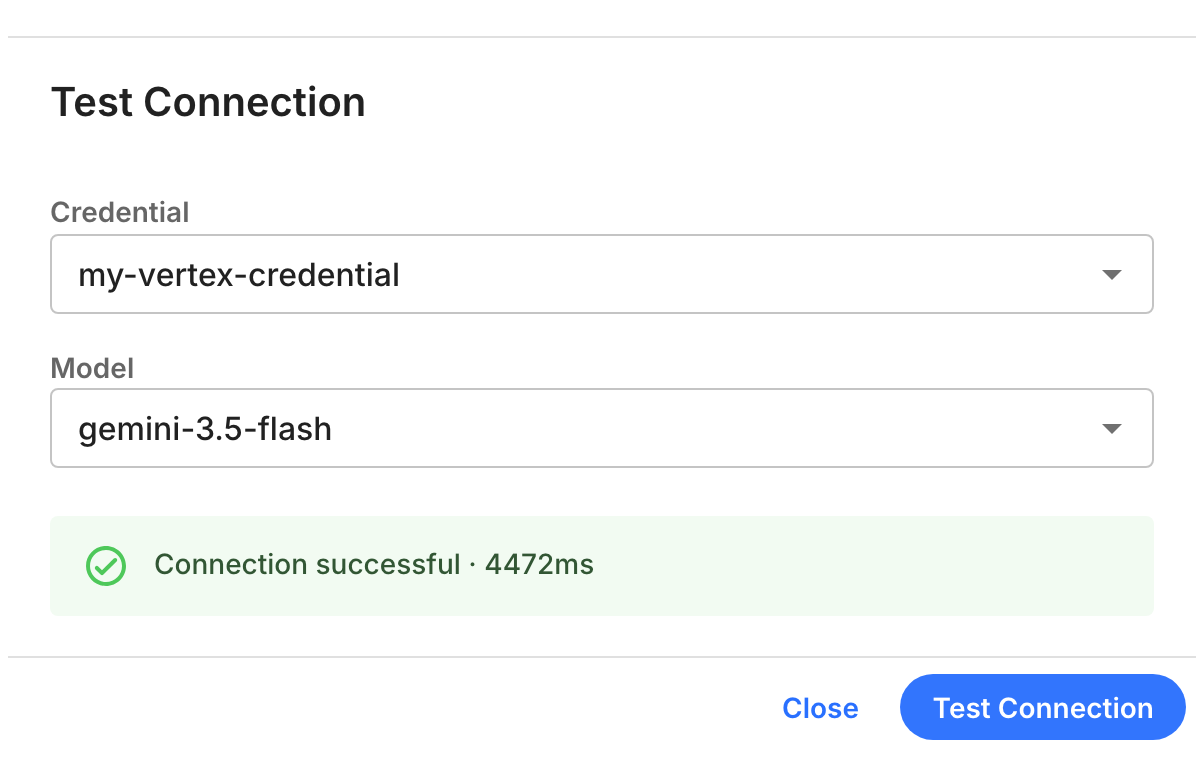
Test Connection after a successful test of a priced judge's credential and model.
A successful test shows the provider's message, such as `Connection successful`, and the response time.
A failed one shows why the provider rejected the call.
Fix the credential before you continue:
a judge whose calls fail produces no scores and no cost.
**REST API**
List the providers, models, and credentials configured for your organization.
The response carries credential nicknames and IDs, never the secrets themselves.
```bash theme={null}
curl -sS "$FIDDLER_URL/v3/llm-gateway/providers" \
-H "Authorization: Bearer $FIDDLER_API_KEY" \
| jq -r '.data.items[] | "\(.provider)\n models: \([.models[].name] | join(", "))\n credentials: \([.credentials[].name] | join(", "))"'
```
```text theme={null}
fiddler
models: llama3.1-8b, ministral3-8b
credentials:
...
vertex_ai
models: claude-opus-4-8, claude-opus-4-7, claude-opus-4-6, claude-sonnet-5, claude-sonnet-4-6, claude-haiku-4-5, gemini-3.5-flash, ...
credentials: my-vertex-credential
...
```
Keep the list in a variable for the lookups that follow:
```bash theme={null}
PROVIDERS=$(curl -sS "$FIDDLER_URL/v3/llm-gateway/providers" \
-H "Authorization: Bearer $FIDDLER_API_KEY")
```
**Priced judge.** Set `JUDGE_PROVIDER` to a provider from your list,
`JUDGE_MODEL` to a model on that provider that LiteLLM prices,
and `JUDGE_CREDENTIAL` to the nickname of your credential for that provider.
Then look up their IDs:
```bash theme={null}
export JUDGE_PROVIDER="vertex_ai"
export JUDGE_MODEL="gemini-3.5-flash"
export JUDGE_CREDENTIAL="my-vertex-credential"
export JUDGE_MODEL_ID=$(jq -r --arg p "$JUDGE_PROVIDER" --arg m "$JUDGE_MODEL" \
'.data.items[] | select(.provider == $p) | .models[] | select(.name == $m) | .uuid' <<< "$PROVIDERS")
export JUDGE_CREDENTIAL_ID=$(jq -r --arg p "$JUDGE_PROVIDER" --arg c "$JUDGE_CREDENTIAL" \
'.data.items[] | select(.provider == $p) | .credentials[] | select(.name == $c) | .uuid' <<< "$PROVIDERS")
printf 'JUDGE_MODEL_ID=%s\nJUDGE_CREDENTIAL_ID=%s\n' "$JUDGE_MODEL_ID" "$JUDGE_CREDENTIAL_ID"
```
```text theme={null}
JUDGE_MODEL_ID=
JUDGE_CREDENTIAL_ID=
```
**Fiddler-hosted judge.** Look up the model's ID:
```bash theme={null}
export HOSTED_MODEL_ID=$(jq -r \
'.data.items[] | select(.provider == "fiddler") | .models[] | select(.name == "ministral3-8b") | .uuid' <<< "$PROVIDERS")
printf 'HOSTED_MODEL_ID=%s\n' "$HOSTED_MODEL_ID"
```
```text theme={null}
HOSTED_MODEL_ID=
```
Each printed line needs an ID.
An empty one means that a name doesn't match your list;
for the Fiddler-hosted judge, substitute another `fiddler` model from it.
**Priced judge.** Before you build on the credential, test it.
`model_id` takes the `provider/model` form, and `credential_uuid` is required.
The test sends one small request to your provider, which bills it, and changes nothing in Fiddler.
```bash theme={null}
curl -sS -X POST "$FIDDLER_URL/v3/llm-gateway/test-connection" \
-H "Authorization: Bearer $FIDDLER_API_KEY" \
-H "Content-Type: application/json" \
-d "$(jq -n --arg model "$JUDGE_PROVIDER/$JUDGE_MODEL" --arg cred "$JUDGE_CREDENTIAL_ID" \
'{model_id: $model, credential_uuid: $cred}')" \
| jq '.error // .data'
```
```json theme={null}
{
"success": true,
"model": "vertex_ai/gemini-3.5-flash",
"message": "Connection successful",
"response_time_ms": 2985
}
```
`"success": false` means the provider rejected the call,
and `message` says why, for example `Authentication error: Credential for model is not valid`.
Fix the credential before you continue:
a judge whose calls fail produces no scores and no cost.
### 5. Create the Evaluators
An evaluator is the judge's definition,
and it isn't tied to a project.
Both evaluators use the built-in Conciseness evaluator (`conciseness` in the API),
an LLM-as-a-Judge evaluator with a single input, `response`.
**UI**
1. In the left navigation bar, click **Evaluator Library**, then **Add Evaluator**.
2. Choose **Conciseness**, and click **Next**.
3. On the **Configure** step, fill in the fields for your judge from the table below, and click **Next**.
4. On the **Review** step, click **Save**.
Add one evaluator for each judge:
| Field | Priced judge | Fiddler-hosted judge |
| - | - | - |
| **Evaluator Name** | `cost_quickstart_priced_evaluator` | `cost_quickstart_hosted_evaluator` |
| **Provider** | Your provider, such as `vertex_ai` | `fiddler` |
| **Credential** | Your credential for that provider | The one the UI selects, such as **Fiddler Credential** |
| **Model** | A model that LiteLLM prices, such as `gemini-3.5-flash` | `ministral3-8b` |
**Credential** starts with the provider's first credential,
so for the priced judge, check that it's yours.
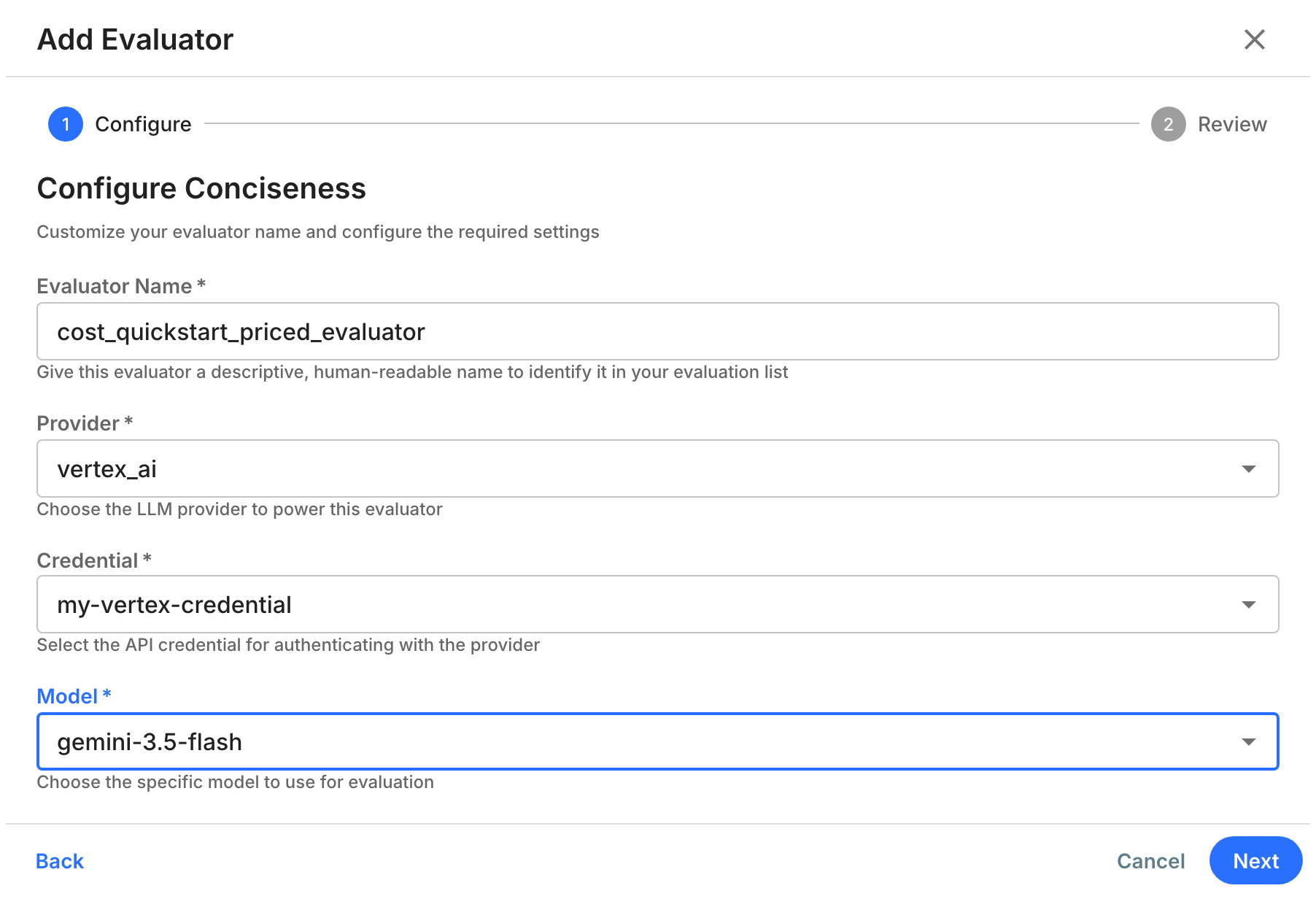
The Configure step of Add Evaluator, filled in for the priced judge.
**REST API**
`enrichment_config.model_id` is the LLM Gateway model ID.
Pass `credential_id` for every provider except `fiddler`:
the schema marks it optional, but without it the judge cannot authenticate to your provider.
**Priced judge:**
```bash theme={null}
RESP=$(curl -sS -X POST "$FIDDLER_URL/v3/evaluators" \
-H "Authorization: Bearer $FIDDLER_API_KEY" \
-H "Content-Type: application/json" \
-d "$(jq -n --arg model "$JUDGE_MODEL_ID" --arg cred "$JUDGE_CREDENTIAL_ID" \
'{name: "cost_quickstart_priced_evaluator", enrichment_name: "conciseness",
enrichment_config: {model_id: $model, credential_id: $cred}}')")
jq -c '.error // (.data | {id, name, enrichment_config, status})' <<< "$RESP"
export PRICED_EVALUATOR_ID=$(jq -r '.data.id' <<< "$RESP")
```
```json theme={null}
{"id":"","name":"cost_quickstart_priced_evaluator","enrichment_config":{"model_id":"","credential_id":""},"status":"ACTIVE"}
```
**Fiddler-hosted judge:**
```bash theme={null}
RESP=$(curl -sS -X POST "$FIDDLER_URL/v3/evaluators" \
-H "Authorization: Bearer $FIDDLER_API_KEY" \
-H "Content-Type: application/json" \
-d "$(jq -n --arg model "$HOSTED_MODEL_ID" \
'{name: "cost_quickstart_hosted_evaluator", enrichment_name: "conciseness",
enrichment_config: {model_id: $model}}')")
jq -c '.error // (.data | {id, name, enrichment_config, status})' <<< "$RESP"
export HOSTED_EVALUATOR_ID=$(jq -r '.data.id' <<< "$RESP")
```
```json theme={null}
{"id":"","name":"cost_quickstart_hosted_evaluator","enrichment_config":{"model_id":""},"status":"ACTIVE"}
```
Evaluator names must be unique across your Fiddler deployment, not just your organization,
and archived evaluators keep theirs.
If a name is taken, the UI shows `Evaluator name must be unique` under **Evaluator Name**,
and the REST API command prints an error with code `409` and the message `An evaluator with name "" already exists`:
change the name and try again.
### 6. Create the Rules
A rule binds an evaluator to an application
and maps the evaluator's inputs to span attributes.
Each rule here maps the evaluator's `response` input to `gen_ai.llm.output`, the LLM's response text.
**UI**
1. In the left navigation bar, click **GenAI Apps**, open `cost_quickstart_app`, and click the **Evaluator Rules** tab.
2. Click **Add Rule**, select **Use Existing Evaluator**, choose your evaluator under **Select Evaluator**, and click **Next**.
3. On the **Apply Rules** step, leave the conditions empty, and click **Next**.
4. On the **Map Evaluator** step, set **Response** to `gen_ai.llm.output`, and click **Next**.
5. On the **Review** step, enter the **Rule Name**, select **No backfill**,
leave **Sampling rate** blank if the dialog shows it, so that the rule judges every span,
and click **Save**.
Add one rule for each evaluator:
| Judge | Evaluator | Rule Name |
| - | - | - |
| Priced judge | `cost_quickstart_priced_evaluator` | `cost_quickstart_priced` |
| Fiddler-hosted judge | `cost_quickstart_hosted_evaluator` | `cost_quickstart_hosted` |
For every option in the dialog, see [Evaluator Rules](https://docs.fiddler.ai/evaluate-and-test/evaluator-rules.md).
**REST API**
Ask which inputs an evaluator needs and which attributes it suggests.
The command asks about the priced judge,
or about the Fiddler-hosted judge if that's the only one you created:
```bash theme={null}
curl -sS -X POST "$FIDDLER_URL/v3/evaluator-rules/map-input-keys" \
-H "Authorization: Bearer $FIDDLER_API_KEY" \
-H "Content-Type: application/json" \
-d "$(jq -n --arg app "$APPLICATION_ID" --arg ev "${PRICED_EVALUATOR_ID:-$HOSTED_EVALUATOR_ID}" \
'{application_id: $app, evaluator_id: $ev}')" \
| jq '.error // (.data | {required: .rule_input_keys.required, attribute_names})'
```
```json theme={null}
{
"required": [
"response"
],
"attribute_names": [
"gen_ai.llm.input.system",
"gen_ai.tool.output",
"gen_ai.llm.input.user",
"gen_ai.tool.input",
"gen_ai.llm.output"
]
}
```
A new application has no traces yet, so `attribute_names` suggests common GenAI attributes;
once traces arrive, it lists the attributes seen on your spans.
Create one rule for each evaluator with a small helper that takes the rule's name and the evaluator's ID:
```bash theme={null}
create_rule() {
curl -sS -X POST "$FIDDLER_URL/v3/evaluator-rules" \
-H "Authorization: Bearer $FIDDLER_API_KEY" \
-H "Content-Type: application/json" \
-d "$(jq -n --arg name "$1" --arg app "$APPLICATION_ID" --arg ev "$2" \
'{name: $name, application_id: $app, evaluator_id: $ev,
mapped_input_keys: {response: "gen_ai.llm.output"}}')"
}
```
**Priced judge:**
```bash theme={null}
PRICED_RULE=$(create_rule cost_quickstart_priced "$PRICED_EVALUATOR_ID")
jq -c '.error // (.data | {id, name, mapped_input_keys, enabled})' <<< "$PRICED_RULE"
export PRICED_RULE_ID=$(jq -r '.data.id' <<< "$PRICED_RULE")
```
```json theme={null}
{"id":"","name":"cost_quickstart_priced","mapped_input_keys":{"response":"gen_ai.llm.output"},"enabled":true}
```
**Fiddler-hosted judge:**
```bash theme={null}
HOSTED_RULE=$(create_rule cost_quickstart_hosted "$HOSTED_EVALUATOR_ID")
jq -c '.error // (.data | {id, name, mapped_input_keys, enabled})' <<< "$HOSTED_RULE"
export HOSTED_RULE_ID=$(jq -r '.data.id' <<< "$HOSTED_RULE")
```
```json theme={null}
{"id":"","name":"cost_quickstart_hosted","mapped_input_keys":{"response":"gen_ai.llm.output"},"enabled":true}
```
With no filters, a rule matches every span in the application.
A span without the mapped attribute is skipped rather than judged,
so only LLM spans that carry `gen_ai.llm.output` cost anything.
### 7. Send a Trace
New rules take up to 60 seconds to reach the evaluation workers,
so this step waits a minute before it sends anything.
Traces go to the OTLP endpoint, `POST /v1/traces`,
with your API key as a bearer token
and the application ID in both the `fiddler-application-id` header and the `application.id` resource attribute.
The request sends one LLM span as OTLP/HTTP JSON,
stamped with the current time:
```bash theme={null}
sleep 60
TRACE_ID=$(openssl rand -hex 16)
SPAN_ID=$(openssl rand -hex 8)
START_NS=$(( $(date -u +%s) * 1000000000 ))
END_NS=$(( START_NS + 2000000000 ))
BODY=$(jq -n --arg app "$APPLICATION_ID" --arg trace "$TRACE_ID" --arg span "$SPAN_ID" \
--arg start_ns "$START_NS" --arg end_ns "$END_NS" '{
resourceSpans: [{
resource: {attributes: [
{key: "application.id", value: {stringValue: $app}},
{key: "service.name", value: {stringValue: "cost-quickstart"}}
]},
scopeSpans: [{
scope: {name: "cost-quickstart"},
spans: [{
traceId: $trace, spanId: $span, name: "chat_completion", kind: 1,
startTimeUnixNano: $start_ns, endTimeUnixNano: $end_ns,
attributes: [
{key: "fiddler.span.type", value: {stringValue: "llm"}},
{key: "gen_ai.agent.name", value: {stringValue: "support_agent"}},
{key: "gen_ai.llm.input.user", value: {stringValue: "How do I reset my password?"}},
{key: "gen_ai.llm.output", value: {stringValue: "Go to Settings > Security and select Reset password. We will email you a reset link that expires in 30 minutes."}}
],
status: {code: 1}
}]
}]
}]}')
curl -sS -X POST "$FIDDLER_URL/v1/traces" \
-H "Authorization: Bearer $FIDDLER_API_KEY" \
-H "fiddler-application-id: $APPLICATION_ID" \
-H "Content-Type: application/json" \
-d "$BODY" -w '\nHTTP %{http_code}\n'
echo "TRACE_ID=$TRACE_ID"
```
```text theme={null}
{"partialSuccess":{}}
HTTP 200
TRACE_ID=
```
An empty `partialSuccess` means that Fiddler accepted every span.
The span's cost takes up to about two hours to appear;
step 9 explains the timing.
To send real traces from your own application, instrument it with OpenTelemetry or a Fiddler SDK:
start from [Agentic Observability](https://docs.fiddler.ai/getting-started/agentic-monitoring.md),
replay stored traces with [Exporting OTel Traces to Fiddler](https://docs.fiddler.ai/integrations/agentic-ai/otel-trace-export.md),
and see [Span and Resource Attributes](https://docs.fiddler.ai/integrations/agentic-ai/attributes.md) for the attributes Fiddler reads.
### 8. Check That the Judges Ran
The judges score a span within minutes of its arrival.
**UI**
1. In the left navigation bar, click **GenAI Apps**, open `cost_quickstart_app`, and click the **Explorer** tab.
2. On the `chat_completion` span's row, click the **View Trace** icon.
3. Scroll the span's details down to the **Evaluators** section.
It lists each rule that judged the span, with an **Output Name** and a **Value** for each of the rule's outputs.
Both rules appear there, `cost_quickstart_priced` and `cost_quickstart_hosted`, or only your judge's rule.
For more about the Explorer, see [Explorer](https://docs.fiddler.ai/observability/agentic/trace-explorer.md).
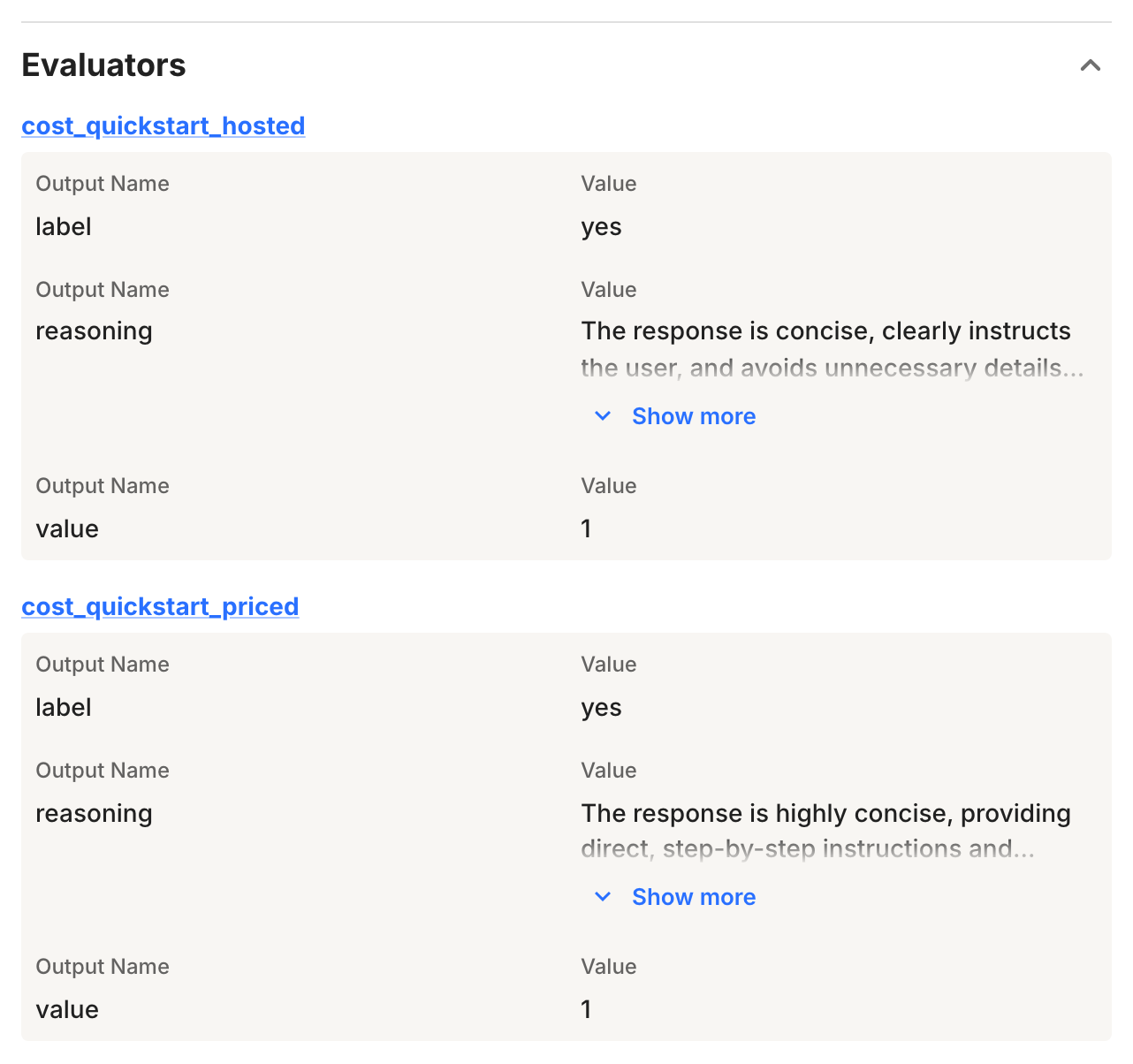
The span's Evaluators section in the Explorer, with each rule's outputs.
**REST API**
`POST /v3/spans/fields` counts, for a time window, the spans that carry each rule's outputs:
```bash theme={null}
curl -sS -X POST "$FIDDLER_URL/v3/spans/fields" \
-H "Authorization: Bearer $FIDDLER_API_KEY" \
-H "Content-Type: application/json" \
-d "$(jq -n --arg app "$APPLICATION_ID" '{application_id: $app,
start_time: (now - 3*3600 | strftime("%Y-%m-%dT%H:%M:%SZ")),
end_time: (now | strftime("%Y-%m-%dT%H:%M:%SZ"))}')" \
| jq -r '.error // (.data | "spans: \(.total_spans)",
(.evaluator_outputs[] | select(.output_name == "label") | "\(.rule_name): \(.count) scored"))'
```
```text theme={null}
spans: 1
cost_quickstart_priced: 1 scored
cost_quickstart_hosted: 1 scored
```
If cost collection is on, a rule that scored its spans has also recorded their cost,
which reaches `GET /v3/cost/evaluators` once the hourly roll-up includes the span's hour.
### 9. Wait for the Hourly Roll-Up
The Fiddler UI doesn't show evaluator cost,
so this step and the next use the REST API in both flavors.
`GET /v3/cost/evaluators` reads hourly totals, not individual judge calls,
so cost reaches it in three stages:
**1. The Judge Runs**
Within minutes of the span's arrival, the judge scores it, and Fiddler records the call's tokens and estimated cost against the span's start time.
**2. The Span's UTC Hour Closes**
The roll-up never includes the hour in progress, so the current hour is always empty.
**3. The Next Hourly Roll-Up Runs**
Each run totals the two completed UTC hours before it. When it finishes, the span's cost appears in the response.
The span from step 7 can take up to about two hours to appear:
up to an hour for its UTC hour to close, then up to an hour for the next run.
Until then, the endpoint returns a well-formed response with no items for your project.
The data changes only once an hour, so polling every 10 minutes is enough.
This loop stops as soon as the first items appear, or after three hours:
```bash theme={null}
DEADLINE=$(( $(date -u +%s) + 10800 ))
while true; do
RESP=$(curl -sS -G "$FIDDLER_URL/v3/cost/evaluators" \
-H "Authorization: Bearer $FIDDLER_API_KEY" \
--data-urlencode "project_id=$PROJECT_ID")
N=$(jq -e '.data.items | arrays | length' <<< "$RESP") && [ -n "$N" ] || { printf '%s\n' "$RESP"; break; }
echo "$(date -u +%H:%M:%SZ) items: $N"
[ "$N" -gt 0 ] && break
[ "$(date -u +%s)" -lt "$DEADLINE" ] || { echo "Still no items after three hours."; break; }
sleep 600
done
```
```text theme={null}
15:48:00Z items: 0
15:58:00Z items: 0
16:08:01Z items: 0
16:18:01Z items: 0
16:28:01Z items: 0
16:38:02Z items: 0
16:48:02Z items: 0
16:58:07Z items: 2
```
If a request fails, the loop prints the response, such as an error message, and stops.
If it stops with `Still no items after three hours.` and step 8 showed that the judges ran,
cost collection is probably off for your deployment; see [Availability](#availability).
### 10. Read Cost and Tokens
Every query below filters to the demo project,
because other applications in your organization may have evaluator cost too.
#### The Default Window
With no time bounds, the response covers the last 30 days, snapped to whole UTC hours:
```bash theme={null}
curl -sS -G "$FIDDLER_URL/v3/cost/evaluators" \
-H "Authorization: Bearer $FIDDLER_API_KEY" \
--data-urlencode "project_id=$PROJECT_ID" \
| jq '.data'
```
```jsonc theme={null}
{
"page_size": 100,
"total": 2,
"item_count": 2,
"page_count": 1,
"page_index": 1,
"offset": 0,
"items": [
{
"project_id": "",
"project_name": "cost_quickstart",
"application_id": "",
"application_name": "cost_quickstart_app",
"application_creator": {
"id": "",
"full_name": "",
"email": ""
},
"evaluator_rule_id": "",
"evaluator_rule_name": "cost_quickstart_priced",
"tokens": {
"input": 411,
"output": 474,
"total": 885
},
"cost_usd_estimated": 0.0048825,
"llm_models": [
"vertex_ai/gemini-3.5-flash"
]
},
{
// project, application, and creator fields as above
"evaluator_rule_id": "",
"evaluator_rule_name": "cost_quickstart_hosted",
"tokens": {
"input": 612,
"output": 86,
"total": 698
},
"cost_usd_estimated": null,
"llm_models": [
"fiddler/ministral3-8b"
]
}
],
"meta": {
"time_range": {
"start": "2026-09-05T16:00:00Z",
"end": "2026-10-05T17:00:00Z"
},
"earliest_available_data": "2026-10-05T15:00:00Z",
"disclaimer": "Cost estimates are based on LiteLLM open-source pricing tables, may lag provider changes, and should not be treated as exact billing."
}
}
```
* Items sort by `cost_usd_estimated`, highest first, with `null` last.
* The estimate multiplies each call's input and output tokens by the model's list prices in LiteLLM's open-source pricing tables.
Here, 411 input tokens at 1.50 USD per million plus 474 output tokens at 9.00 USD per million come to 0.0048825 USD.
* The Fiddler-hosted judge used real tokens and reports `cost_usd_estimated: null`.
`null` is not zero: handle it explicitly whenever you add up costs.
* `llm_models` lists the judge models each rule's calls used, as `provider/model`, sorted.
A rule lists more than one when its evaluator's model changes during the window.
It's `null` when no hour in the window has model data, as with hours rolled up before Fiddler 26.25.
#### An Explicit Window
This query covers the last 24 hours and prints one line per rule:
```bash theme={null}
curl -sS -G "$FIDDLER_URL/v3/cost/evaluators" \
-H "Authorization: Bearer $FIDDLER_API_KEY" \
--data-urlencode "project_id=$PROJECT_ID" \
--data-urlencode "start_time=$(jq -rn 'now - 86400 | strftime("%Y-%m-%dT%H:%M:%SZ")')" \
--data-urlencode "end_time=$(jq -rn 'now | strftime("%Y-%m-%dT%H:%M:%SZ")')" \
| jq -r '"window: \(.data.meta.time_range.start) to \(.data.meta.time_range.end)",
(.data.items[] | "\(.evaluator_rule_name // "(deleted rule)")\t\(if .cost_usd_estimated == null then "unpriced" else "$\(.cost_usd_estimated)" end)\t\(.tokens.total // "?") tokens")'
```
```text theme={null}
window: 2026-10-04T16:00:00Z to 2026-10-05T17:00:00Z
cost_quickstart_priced $0.0048825 885 tokens
cost_quickstart_hosted unpriced 698 tokens
```
Both bounds need a `Z` or a UTC offset; a timestamp without one returns `400`.
`-G` with `--data-urlencode` makes `curl` encode the colons in the timestamps.
The start snaps down and the end snaps up to whole UTC hours,
so the window queried, printed on the first line, is never narrower than the one you asked for.
A window can span at most 366 days.
#### Group by Application or Project
`group_by` sets what each item totals: `both` (the default) gives one item per application and rule,
`application_id` one per application, and `project_id` one per project.
```bash theme={null}
for g in both application_id project_id; do
echo "group_by=$g"
curl -sS -G "$FIDDLER_URL/v3/cost/evaluators" \
-H "Authorization: Bearer $FIDDLER_API_KEY" \
--data-urlencode "project_id=$PROJECT_ID" \
--data-urlencode "group_by=$g" \
| jq -c '.data.items[] | {application_name, evaluator_rule_name, tokens, cost_usd_estimated, llm_models}'
done
```
```text theme={null}
group_by=both
{"application_name":"cost_quickstart_app","evaluator_rule_name":"cost_quickstart_priced","tokens":{"input":411,"output":474,"total":885},"cost_usd_estimated":0.0048825,"llm_models":["vertex_ai/gemini-3.5-flash"]}
{"application_name":"cost_quickstart_app","evaluator_rule_name":"cost_quickstart_hosted","tokens":{"input":612,"output":86,"total":698},"cost_usd_estimated":null,"llm_models":["fiddler/ministral3-8b"]}
group_by=application_id
{"application_name":"cost_quickstart_app","evaluator_rule_name":null,"tokens":{"input":1023,"output":560,"total":1583},"cost_usd_estimated":0.0048825,"llm_models":["fiddler/ministral3-8b","vertex_ai/gemini-3.5-flash"]}
group_by=project_id
{"application_name":null,"evaluator_rule_name":null,"tokens":{"input":1023,"output":560,"total":1583},"cost_usd_estimated":0.0048825,"llm_models":["fiddler/ministral3-8b","vertex_ai/gemini-3.5-flash"]}
```
`application_id` adds up an application's rules, so the rule fields are `null`;
`project_id` adds up a project's applications, so the application fields are `null` too.
`llm_models` combines the models of every rule in the group, here both judges.
Compare the totals:
the tokens cover both rules, but the cost covers only the priced one.
A group that mixes priced and unpriced calls reports less cost than its tokens suggest,
and nothing in the response flags it.
#### Filter by Application
`project_id` narrows the response to one project, and `application_id` to one application:
```bash theme={null}
curl -sS -G "$FIDDLER_URL/v3/cost/evaluators" \
-H "Authorization: Bearer $FIDDLER_API_KEY" \
--data-urlencode "application_id=$APPLICATION_ID" \
| jq -c '.data | {total, rules: [.items[].evaluator_rule_name]}'
```
```json theme={null}
{"total":2,"rules":["cost_quickstart_priced","cost_quickstart_hosted"]}
```
An ID that doesn't exist returns `400`,
while an ID in your organization that you can't read returns an empty `200`.
#### Page Through the Results
`limit` sets the page size, from 1 to 500 (default 100, unless your deployment sets a different page size), and `offset` skips that many items:
```bash theme={null}
for offset in 0 1; do
curl -sS -G "$FIDDLER_URL/v3/cost/evaluators" \
-H "Authorization: Bearer $FIDDLER_API_KEY" \
--data-urlencode "project_id=$PROJECT_ID" \
--data-urlencode "limit=1" \
--data-urlencode "offset=$offset" \
| jq -c '.data | {offset, page_index, page_count, total, rule: .items[0].evaluator_rule_name}'
done
```
```json theme={null}
{"offset":0,"page_index":1,"page_count":2,"total":2,"rule":"cost_quickstart_priced"}
{"offset":1,"page_index":2,"page_count":2,"total":2,"rule":"cost_quickstart_hosted"}
```
Ties in cost are broken by application name, rule name, and IDs,
so pages never shift between requests for an unchanged window.
#### Read the Meta Block
Every response carries a `meta` block, even when `items` is empty.
This query asks for the current UTC hour:
```bash theme={null}
curl -sS -G "$FIDDLER_URL/v3/cost/evaluators" \
-H "Authorization: Bearer $FIDDLER_API_KEY" \
--data-urlencode "project_id=$PROJECT_ID" \
--data-urlencode "start_time=$(jq -rn 'now | strftime("%Y-%m-%dT%H:00:00Z")')" \
| jq '{items: (.data.items | length), meta: .data.meta}'
```
```json theme={null}
{
"items": 0,
"meta": {
"time_range": {
"start": "2026-10-05T16:00:00Z",
"end": "2026-10-05T17:00:00Z"
},
"earliest_available_data": "2026-10-05T15:00:00Z",
"disclaimer": "Cost estimates are based on LiteLLM open-source pricing tables, may lag provider changes, and should not be treated as exact billing."
}
}
```
* `time_range` is the window actually queried, after snapping.
The current hour is always empty, because the roll-up hasn't covered it yet.
* `earliest_available_data` is the start of the earliest hour with cost data
for the applications in scope for this request, which your access and filters decide.
It doesn't depend on the window, so here it shows that data exists even though the current hour is empty.
It is `null` until anything in scope has been rolled up.
Two users can see different values, so don't treat it as a constant for your organization.
* `disclaimer` is a fixed string.
Show it wherever you show the numbers.
### 11. (Optional) Delete a Rule and Keep Its Cost
Deleting a rule removes its scores but not its cost:
cost is a record of spend, and deleting a rule doesn't undo it.
**UI**
1. In the application's **Evaluator Rules** tab, scroll to the right end of the `cost_quickstart_priced` rule's row,
or of `cost_quickstart_hosted` if that's your only rule, open its ⋮ menu, and click **Delete**.
2. Type `delete`, and click **Delete Evaluator Rule**.
Then read the cost again:
```bash theme={null}
curl -sS -G "$FIDDLER_URL/v3/cost/evaluators" \
-H "Authorization: Bearer $FIDDLER_API_KEY" \
--data-urlencode "project_id=$PROJECT_ID" \
| jq -c '.data.items[] | {evaluator_rule_id, evaluator_rule_name, tokens, cost_usd_estimated, llm_models}'
```
```text theme={null}
{"evaluator_rule_id":null,"evaluator_rule_name":null,"tokens":{"input":411,"output":474,"total":885},"cost_usd_estimated":0.0048825,"llm_models":["vertex_ai/gemini-3.5-flash"]}
{"evaluator_rule_id":"","evaluator_rule_name":"cost_quickstart_hosted","tokens":{"input":612,"output":86,"total":698},"cost_usd_estimated":null,"llm_models":["fiddler/ministral3-8b"]}
```
**REST API**
The command deletes the priced rule,
or the Fiddler-hosted rule if that's your only one:
```bash theme={null}
curl -sS -X DELETE "$FIDDLER_URL/v3/evaluator-rules/${PRICED_RULE_ID:-$HOSTED_RULE_ID}" \
-H "Authorization: Bearer $FIDDLER_API_KEY" -w ' HTTP %{http_code}\n'
curl -sS -G "$FIDDLER_URL/v3/cost/evaluators" \
-H "Authorization: Bearer $FIDDLER_API_KEY" \
--data-urlencode "project_id=$PROJECT_ID" \
| jq -c '.data.items[] | {evaluator_rule_id, evaluator_rule_name, tokens, cost_usd_estimated, llm_models}'
```
```text theme={null}
{} HTTP 200
{"evaluator_rule_id":null,"evaluator_rule_name":null,"tokens":{"input":411,"output":474,"total":885},"cost_usd_estimated":0.0048825,"llm_models":["vertex_ai/gemini-3.5-flash"]}
{"evaluator_rule_id":"","evaluator_rule_name":"cost_quickstart_hosted","tokens":{"input":612,"output":86,"total":698},"cost_usd_estimated":null,"llm_models":["fiddler/ministral3-8b"]}
```
The deleted rule's ID and name are now `null`, and its tokens, cost, and models are unchanged.
Its scores are gone, though: run step 8 again, and the deleted rule is no longer listed.
### 12. Clean Up
Evaluators can't be deleted, only archived,
and archiving an evaluator also deletes every rule that uses it, in every application.
Deleting an application is asynchronous:
a background job removes the application's traces, scores, and rules,
and the project can be deleted only once that job finishes.
**UI**
1. Archive each evaluator: in the left navigation bar, click **Evaluator Library**, open the evaluator, click **Archive**, and click **Confirm**.
When its status changes to **Archived**, close the dialog.
2. Delete the application: click **GenAI Apps**, open the ⋮ menu at the right end of the `cost_quickstart_app` row, and click **Delete**.
Type `delete`, and click **Delete Application**.
You can follow the deletion job under **Jobs** in the left navigation bar.
The UI can't delete a GenAI project,
so delete it with the API once the application's deletion job finishes.
Until then, the request returns `409` with the message `Project cannot be deleted as it contains an application being deleted.`;
wait a minute and run it again.
```bash theme={null}
curl -sS -X DELETE "$FIDDLER_URL/v3/projects/$PROJECT_ID" \
-H "Authorization: Bearer $FIDDLER_API_KEY" -w ' HTTP %{http_code}\n'
```
```text theme={null}
{} HTTP 200
```
**REST API**
Deleting the application returns `202`.
The loop skips a judge you didn't create.
```bash theme={null}
for id in "$PRICED_EVALUATOR_ID" "$HOSTED_EVALUATOR_ID"; do
[ -n "$id" ] || continue
curl -sS -X POST "$FIDDLER_URL/v3/evaluators/$id/archive" \
-H "Authorization: Bearer $FIDDLER_API_KEY" \
| jq -c '.error // (.data | {name, status})'
done
curl -sS -X DELETE "$FIDDLER_URL/v3/applications/$APPLICATION_ID" \
-H "Authorization: Bearer $FIDDLER_API_KEY" -w ' HTTP %{http_code}\n'
```
```text theme={null}
{"name":"cost_quickstart_priced_evaluator","status":"ARCHIVED"}
{"name":"cost_quickstart_hosted_evaluator","status":"ARCHIVED"}
{"data": {"job": {"id": "", "name": "Application deletion"}}, "api_version": "3.0", "kind": "NORMAL"} HTTP 202
```
Once the application's deletion finishes, delete the project.
Until then, the request returns `409` with the message `Project cannot be deleted as it contains an application being deleted.`;
wait a minute and run it again.
To check on the deletion, pass the `job.id` from the response above to `GET /v3/jobs/{job_id}`:
its `status` is `SUCCESS` when the deletion is done.
```bash theme={null}
curl -sS -X DELETE "$FIDDLER_URL/v3/projects/$PROJECT_ID" \
-H "Authorization: Bearer $FIDDLER_API_KEY" -w ' HTTP %{http_code}\n'
```
```text theme={null}
{} HTTP 200
```
A deleted application's cost no longer appears in `GET /v3/cost/evaluators`.
If you entered IDs in the panel in step 1, click its **Clear** button:
the objects they point to no longer exist.
***
## Troubleshooting
| Symptom | Cause | What to do |
| - | - | - |
| `503` from `GET /v3/cost/evaluators` | The Evaluator Cost API is not enabled for your deployment. | See [Availability](#availability). |
| `200` with `content-type: text/html` | Your deployment runs a Fiddler version older than 26.22, so the request never reached the API. | Upgrade to Fiddler 26.22 or later. |
| `401` | The URL or the API key is wrong. | Check `FIDDLER_URL` (no trailing slash, no `/v3`) and the key. |
| `429` | You hit the rate limit. | Wait for the number of seconds in the `Retry-After` header. |
| `400` | A timestamp without a `Z` or offset, `start_time` at or after `end_time`, a window longer than 366 days, an invalid `group_by`, `limit` outside 1–500, or a malformed or unknown ID. | Read `error.message` in the response. |
| No items, and `earliest_available_data` is `null` | Nothing in scope has been rolled up yet, or cost collection is off. | Check that the judges ran (step 8), then wait for the next hourly run after the span's hour closes. If the project is still empty three hours after you sent the trace, see [Availability](#availability). |
| No items, but `earliest_available_data` is set | Cost data exists, but not in the window you asked for, such as the current hour. | Compare `meta.time_range` with `earliest_available_data`. |
| Tokens, but `cost_usd_estimated` is `null` | Every call in that item was unpriced: a Fiddler-hosted judge, or a model that LiteLLM's pricing tables don't cover yet. | Expected for Fiddler-hosted models. For a dollar figure, use a priced model through your own credential. |
| No `llm_models` field, or `llm_models` is `null` | Your deployment runs a Fiddler version older than 26.25, so the field is missing, or every hour in the window was rolled up before the upgrade. | Upgrade to Fiddler 26.25 or later. Hours rolled up after the upgrade list their models. |
| No scores a few minutes after you sent the trace | The trace arrived less than 60 seconds after the rule was created, the span lacks the mapped attribute, or the judge's calls fail. | Send another trace, check the rule's input mapping (`mapped_input_keys`) against the span's attributes, and test the judge's connection as in step 4. |
## Quick Reference
| Action | Method and path |
| - | - |
| Check the Fiddler version | `GET /v3/server-info` |
| Read evaluator cost | `GET /v3/cost/evaluators` |
| Create a project | `POST /v3/projects` |
| Create an application | `POST /v3/applications` |
| List LLM Gateway providers | `GET /v3/llm-gateway/providers` |
| Test a model and credential | `POST /v3/llm-gateway/test-connection` |
| Create an evaluator | `POST /v3/evaluators` |
| Discover an evaluator's inputs | `POST /v3/evaluator-rules/map-input-keys` |
| Create a rule | `POST /v3/evaluator-rules` |
| Send traces | `POST /v1/traces` (OTLP) |
| Count scored spans | `POST /v3/spans/fields` |
| Delete a rule | `DELETE /v3/evaluator-rules/{id}` |
| Archive an evaluator | `POST /v3/evaluators/{id}/archive` |
| Delete an application | `DELETE /v3/applications/{id}` |
| Check an asynchronous job | `GET /v3/jobs/{id}` |
| Delete a project | `DELETE /v3/projects/{id}` |
**`GET /v3/cost/evaluators` parameters:** `start_time` and `end_time` (ISO 8601 with a `Z` or offset; default the last 30 days; snapped to whole UTC hours),
`group_by` (`both`, `application_id`, or `project_id`), `project_id`, `application_id`, `limit` (1–500, default 100 unless your deployment sets a different page size), and `offset`.
***
## Next Steps
* [**Evaluator Costs REST API**](https://docs.fiddler.ai/sdk-api/rest-api/evaluator-costs/get-cost-evaluators.md): the full parameter and response reference for `GET /v3/cost/evaluators`
* [**Configure Evaluator Downsampling**](https://docs.fiddler.ai/evaluate-and-test/configure-evaluator-downsampling.md): score a fraction of spans to cut what your judges cost
* [**Evaluator Rules**](https://docs.fiddler.ai/evaluate-and-test/evaluator-rules.md): create and manage rules from the UI
* [**LLM Gateway**](https://docs.fiddler.ai/reference/administration/llm-gateway.md): add the providers, models, and credentials your judges use
* [**Agentic Observability**](https://docs.fiddler.ai/getting-started/agentic-monitoring.md): instrument your application to send real traces