> ## Documentation Index
> Fetch the complete documentation index at: https://docs.fiddler.ai/llms.txt
> Use this file to discover all available pages before exploring further.
# Customizing Your Model Schema
> Delve into our guide to customize your Model Schema with Fiddler. Learn how to adjust a column’s value range, possible values, and data type to match your model.
There can be occasions when the `fdl.ModelSchema` object generated by `fdl.Model.from_data` infers a column's data type **differently than the type intended** by the model developer. In these cases you can modify the ModelSchema columns as needed prior to creating the model in Fiddler.
Let's walk through an example of how to do this.
***
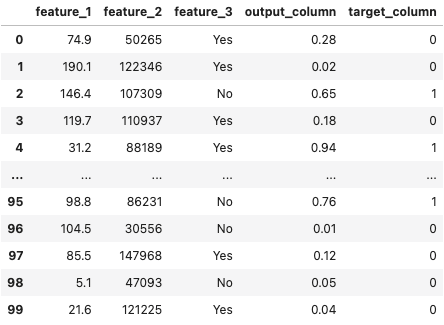
Suppose you've loaded in a dataset as a pandas DataFrame.
```python theme={null}
import pandas as pd
df = pd.read_csv('example_dataset.csv')
```
Below is an example of what is displayed upon inspection.
 ***
You then create a `fdl.Model` object by inferring the column schema details from this DataFrame.
```python theme={null}
model = fdl.Model.from_data(
name='my_model',
project_id=PROJECT_ID,
source=df,
)
```
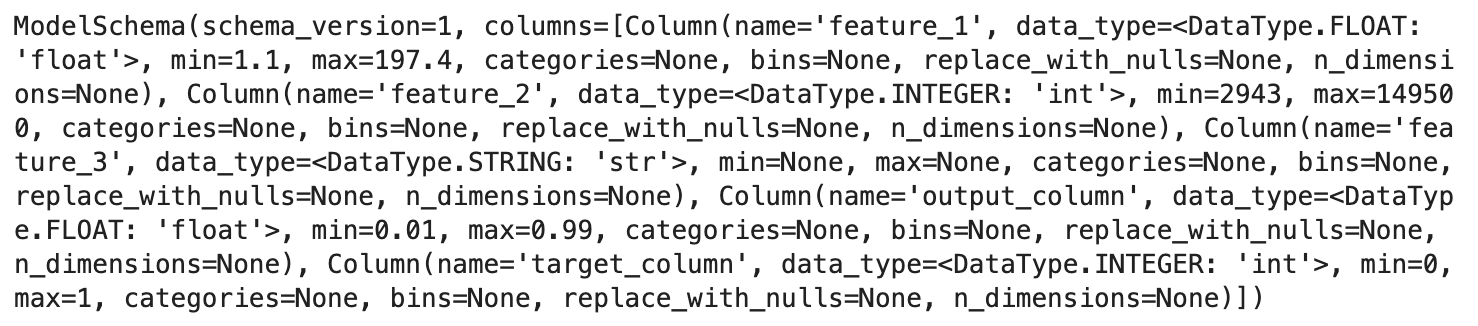
Below is an example of what is displayed upon inspection of `model.schema`.
***
You then create a `fdl.Model` object by inferring the column schema details from this DataFrame.
```python theme={null}
model = fdl.Model.from_data(
name='my_model',
project_id=PROJECT_ID,
source=df,
)
```
Below is an example of what is displayed upon inspection of `model.schema`.
 ```json theme={null}
```
Upon inspection you may notice that **a few things are off**:
1. The [value range](#modifying-the-value-range) of `output_column` is set to `[0.01, 0.99]`, when it should really be `[0.0, 1.0]`.
2. There are no [possible values](#modifying-the-possible-values) set for `feature_3`.
3. The [data type](#modifying-the-data-type) of `feature_3` is set to `DataType.STRING`, when it should really be `DataType.CATEGORY`.
4. The [histogram bins](#modifying-the-histogram-bins) for a numerical column may need to be adjusted for better distribution analysis (e.g., quantile-based instead of uniform).
What's the downside of not making sure that ranges and categories are reviewed and properly set? A production traffic event that encodes a number outside of the specified value range or a category value that is not in the set of valid category values will further down the line be flagged as a so-called Data Integrity violation. Depending on the alerting config, this may result in an alert. It's also worth noting however that an event which has a violation in its columns is still processed, and metrics that can be generated are still generated.
The below examples demonstrate how to address each of the issues noted:
#### Modifying the Value Range
Let's say we want to modify the range of `output_column` in the above `fdl.Model` object to be `[0.0, 1.0]`.
You can do this by setting the `min` and `max` of the `output_column` column.
```python theme={null}
model.schema['output_column'].min = 0.0
model.schema['output_column'].max = 1.0
```
#### Modifying the Histogram Bins
By default, Fiddler auto-generates 10 uniform bins for numerical columns based on the column’s min and max values. You can customize these bins to better represent your data distribution — for example, using quantile-based bins or domain-specific ranges.
```python theme={null}
model.schema['output_column'].bins = [0.0, 0.2, 0.4, 0.6, 0.8, 1.0]
```
Custom bins must:
* Be strictly monotonically increasing
* Start at the column’s `min` value
* End at the column’s `max` value
* Have at least 2 and at most 16 boundary values (1 to 15 bins)
Custom bins affect how feature distributions and drift metrics (PSI, JSD) are computed. Bins are used for histogram bucketing in data drift calculations.
#### Modifying the Possible Values
Let’s say we want to modify the possible values of `feature_3` to be `[‘Yes’, ‘No’]`.
You can do this by setting the `categories` of the `feature_3` column.
```python theme={null}
model.schema['feature_3'].categories = ['Yes', 'No']
```
#### Modifying the Data Type
Let's say we want to modify the data type of `feature_3` to be `DataType.CATEGORY`.
You can do this by setting the `data_type` of the `feature_3` column.
```python theme={null}
model.schema['feature_3'].data_type = fdl.DataType.CATEGORY
```
**Note**: when converting a column to a CATEGORY, you must also set the list of unique possible values:
```python theme={null}
model.schema['feature_3'].categories = ['Yes', 'No']
```
**Note**: if converting a column from numeric (integer or float) to a category, you must also remove the min/max numeric range values and bins that were automatically calculated from the sample data.
```python theme={null}
model.schema['output_column'].min = None
model.schema['output_column'].max = None
model.schema['output_column'].bins = None
```
A complete example might look like this:
```python theme={null}
sample_data_df = pd.read_csv('some.csv')
# configure your ModelSpec here
# model_spec = ...
# configure your ModelTask here, or use NOT_SET
# model_task = ...
# Infer your model's schema from a sample of data
ml_model = fdl.Model.from_data(
source=sample_data_df,
name=MODEL_NAME,
version=VERSION_NAME,
project_id=project.id,
spec=model_spec,
task=model_task
)
# Make any adjustments to the inferred ModelSchema BEFORE creating the model
ml_model.schema['feature_3'].data_type = fdl.DataType.CATEGORY
ml_model.schema['feature_3'].categories = ['0', '1']
# The original datatype was inferred as an integer, but we preferred a category.
# Clear out the min, max, and bins values derived from the sample data as they do not apply to categories
ml_model.schema['feature_3'].min = None
ml_model.schema['feature_3'].max = None
ml_model.schema['feature_3'].bins = None
# Now create the model with the inferred schema and your overrides
ml_model.create()
```
```json theme={null}
```
Upon inspection you may notice that **a few things are off**:
1. The [value range](#modifying-the-value-range) of `output_column` is set to `[0.01, 0.99]`, when it should really be `[0.0, 1.0]`.
2. There are no [possible values](#modifying-the-possible-values) set for `feature_3`.
3. The [data type](#modifying-the-data-type) of `feature_3` is set to `DataType.STRING`, when it should really be `DataType.CATEGORY`.
4. The [histogram bins](#modifying-the-histogram-bins) for a numerical column may need to be adjusted for better distribution analysis (e.g., quantile-based instead of uniform).
What's the downside of not making sure that ranges and categories are reviewed and properly set? A production traffic event that encodes a number outside of the specified value range or a category value that is not in the set of valid category values will further down the line be flagged as a so-called Data Integrity violation. Depending on the alerting config, this may result in an alert. It's also worth noting however that an event which has a violation in its columns is still processed, and metrics that can be generated are still generated.
The below examples demonstrate how to address each of the issues noted:
#### Modifying the Value Range
Let's say we want to modify the range of `output_column` in the above `fdl.Model` object to be `[0.0, 1.0]`.
You can do this by setting the `min` and `max` of the `output_column` column.
```python theme={null}
model.schema['output_column'].min = 0.0
model.schema['output_column'].max = 1.0
```
#### Modifying the Histogram Bins
By default, Fiddler auto-generates 10 uniform bins for numerical columns based on the column’s min and max values. You can customize these bins to better represent your data distribution — for example, using quantile-based bins or domain-specific ranges.
```python theme={null}
model.schema['output_column'].bins = [0.0, 0.2, 0.4, 0.6, 0.8, 1.0]
```
Custom bins must:
* Be strictly monotonically increasing
* Start at the column’s `min` value
* End at the column’s `max` value
* Have at least 2 and at most 16 boundary values (1 to 15 bins)
Custom bins affect how feature distributions and drift metrics (PSI, JSD) are computed. Bins are used for histogram bucketing in data drift calculations.
#### Modifying the Possible Values
Let’s say we want to modify the possible values of `feature_3` to be `[‘Yes’, ‘No’]`.
You can do this by setting the `categories` of the `feature_3` column.
```python theme={null}
model.schema['feature_3'].categories = ['Yes', 'No']
```
#### Modifying the Data Type
Let's say we want to modify the data type of `feature_3` to be `DataType.CATEGORY`.
You can do this by setting the `data_type` of the `feature_3` column.
```python theme={null}
model.schema['feature_3'].data_type = fdl.DataType.CATEGORY
```
**Note**: when converting a column to a CATEGORY, you must also set the list of unique possible values:
```python theme={null}
model.schema['feature_3'].categories = ['Yes', 'No']
```
**Note**: if converting a column from numeric (integer or float) to a category, you must also remove the min/max numeric range values and bins that were automatically calculated from the sample data.
```python theme={null}
model.schema['output_column'].min = None
model.schema['output_column'].max = None
model.schema['output_column'].bins = None
```
A complete example might look like this:
```python theme={null}
sample_data_df = pd.read_csv('some.csv')
# configure your ModelSpec here
# model_spec = ...
# configure your ModelTask here, or use NOT_SET
# model_task = ...
# Infer your model's schema from a sample of data
ml_model = fdl.Model.from_data(
source=sample_data_df,
name=MODEL_NAME,
version=VERSION_NAME,
project_id=project.id,
spec=model_spec,
task=model_task
)
# Make any adjustments to the inferred ModelSchema BEFORE creating the model
ml_model.schema['feature_3'].data_type = fdl.DataType.CATEGORY
ml_model.schema['feature_3'].categories = ['0', '1']
# The original datatype was inferred as an integer, but we preferred a category.
# Clear out the min, max, and bins values derived from the sample data as they do not apply to categories
ml_model.schema['feature_3'].min = None
ml_model.schema['feature_3'].max = None
ml_model.schema['feature_3'].bins = None
# Now create the model with the inferred schema and your overrides
ml_model.create()
```