# Installation and Setup

Fiddler offers a **Python SDK client** that lets you connect directly to your Fiddler environment from a Jupyter Notebook or automated pipeline.

***

### Install the Fiddler Client

The client is available for download from PyPI via pip:

```python
pip install -q fiddler-client
```

### Import the Fiddler Client

Once you've installed the client, you can import the `fiddler` package into any Python script:

```python
import fiddler as fdl
```

***

### Authorize the Client

To use the Fiddler client, you will need **authorization details** that contain

* The [URL](#finding-your-url) you are connecting to
* A [personal access token](#finding-your-authorization-token) for your user

#### Find Your URL

The URL should point to **where Fiddler has been deployed** for your organization.

On-premise customers will use the URL specified by their IT operations team. If you are using Fiddler's managed cloud service, you will have been provided with a unique URL, which will be in one of the forms shown below:

```html
# Managed SaaS
https://<YOUR UNIQUE APP NAME>.fiddler.ai

# Managed SaaS Peering
https://<YOUR UNIQUE APP NAME>.cloud.fiddler.ai
```

#### Find Your Authorization Token

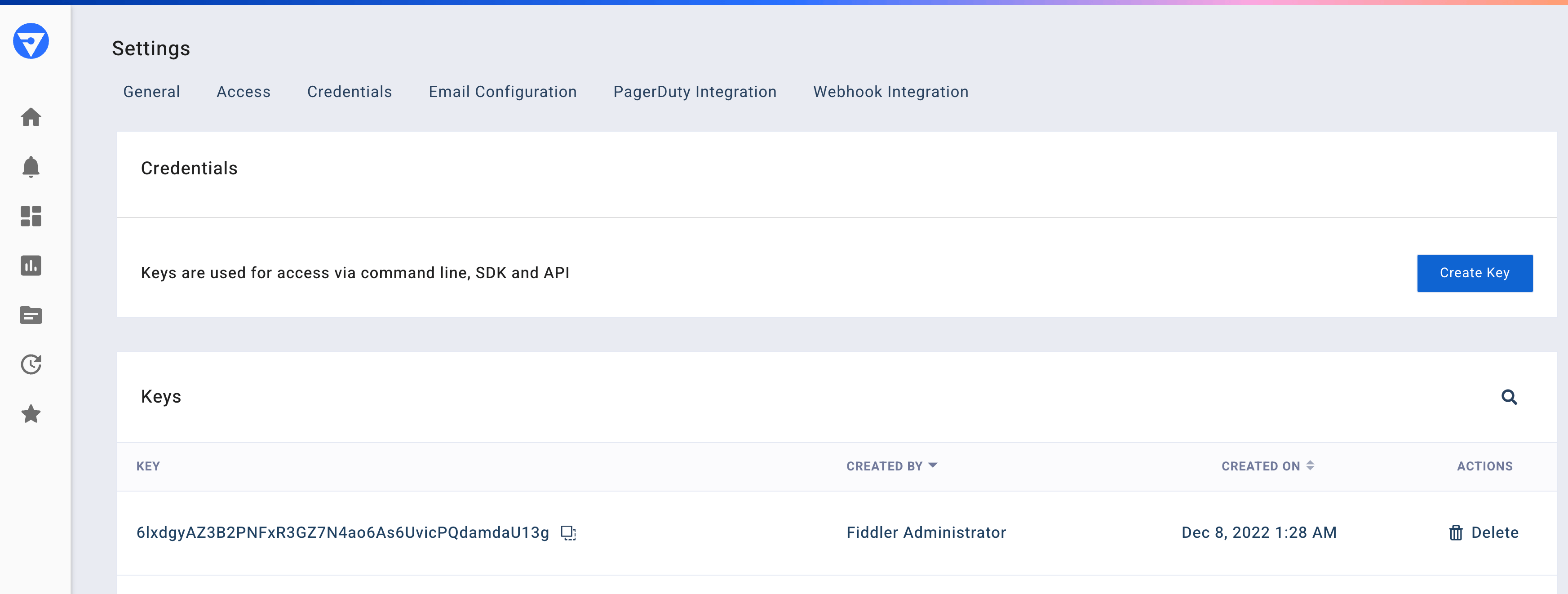
To find your authorization token, navigate to the **Settings** page, click the **Credentials** tab, and then use the **Create Key** button (if there is not already an authorization token for your user).
![Settings page Credentials tab displaying Create Key button](/files/e2qqD2YoR06qKZv3OgBS)

#### Connect the Client to Fiddler

Once you've located the URL of your Fiddler environment and your authorization token, you can connect the Fiddler client to your environment.

```python
import fiddler as fdl

URL = 'https://app.fiddler.ai'
AUTH_TOKEN = ''

# Connect to the Fiddler client
# This call will also validate the client vs server version compatibility.

fdl.init(url=URL, token=AUTH_TOKEN)

print(f'Client version: {fdl.__version__}')
print(f'Server version: {fdl.conn.server_version}')
```

### Set Log Level

Set the log level for the desired verbosity.

```python
import fiddler as fdl
import logging

# Create and configure the root logger prior to calling init() 
logging.basicConfig(
    level=logging.WARN,
    format="%(asctime)s.%(msecs)03d [%(name)s] %(levelname)s: %(message)s",
    datefmt="%y%m%d-%H:%M:%S",
)

fdl.init(url=URL, token=AUTH_TOKEN)
```

> 📘 Info
>
> For detailed documentation on the Fiddler Python Client SDK’s many features, check out the [Python Client SDK reference](/api/fiddler-python-client-sdk/python-client.md) section.


---

# Agent Instructions: Querying This Documentation

If you need additional information that is not directly available in this page, you can query the documentation dynamically by asking a question.

Perform an HTTP GET request on the current page URL with the `ask` query parameter:

```
GET https://docs.fiddler.ai/developers/client-library-reference/installation-and-setup.md?ask=<question>
```

The question should be specific, self-contained, and written in natural language.
The response will contain a direct answer to the question and relevant excerpts and sources from the documentation.

Use this mechanism when the answer is not explicitly present in the current page, you need clarification or additional context, or you want to retrieve related documentation sections.
